TL;DR:
- A Claude Code mod is an ordinary Claude Code plugin whose
hooks/hooks.jsonnames a TypeScript or JavaScript file, and the functions in that file run inside Claude Code's own process - Settings hooks start a separate program and wait for it to exit; function hooks are middleware-style functions that can rewrite events and draw in Claude Code's interface
- The
CLAUDE_CODE_ENABLE_FUNCTION_HOOKSflag from early access is gone: mods are on by default from Claude Code v2.1.287, which ignores the variable - The smallest useful mod is three files, and the demo's 37-line
register.tsxadds a/hellocommand and a red banner above the prompt - Mods hot-reload: saving the file printed
hello-mod: reloaded (3 hooks: session.start, command.run, ui.render)with no restart - Mods can't import npm packages, React components, or WebAssembly, because Claude Code has to read the whole mod and list everything it does before it runs
- An open-source credit-tracker mod showed 10 Firecrawl credits used in one session, 8 of them from four developer index searches, with 1,203 left
Claude Mods are Claude Code plugins with a TypeScript or JavaScript file whose functions Claude Code calls on its own events. That lets a mod redraw the interface and run code while Claude works. Building one comes down to three files and one rule: the file can't import anything Claude Code can't read, which is why DOOM inside Claude Code took a workaround.
What are Claude Mods in Claude Code?
A Claude Code mod is a plugin that changes how Claude Code looks and behaves from inside its own process. It holds function hooks, which are TypeScript or JavaScript functions that Claude Code calls when an event happens. Events include a tool call, a submitted prompt, or part of the interface being drawn. Each hook can watch the event, change it, or answer it.
A plugin is Claude Code's install unit, a folder with a .claude-plugin/plugin.json manifest that can bundle skills, commands, MCP servers, and hooks. Our roundup of the best Claude Code plugins covers what plugins usually carry. A mod adds one thing to that folder: a hooks module, the code file Claude Code loads.
Anthropic calls the feature Claude Mods, and "function hook" stays the engineering name for the primitive underneath. Claude Code's interface is built with React, so a hook can hand Claude Code a tree of interface elements and have it drawn on screen. That is how people have put Tetris, a terminal web browser, and DOOM above the prompt.
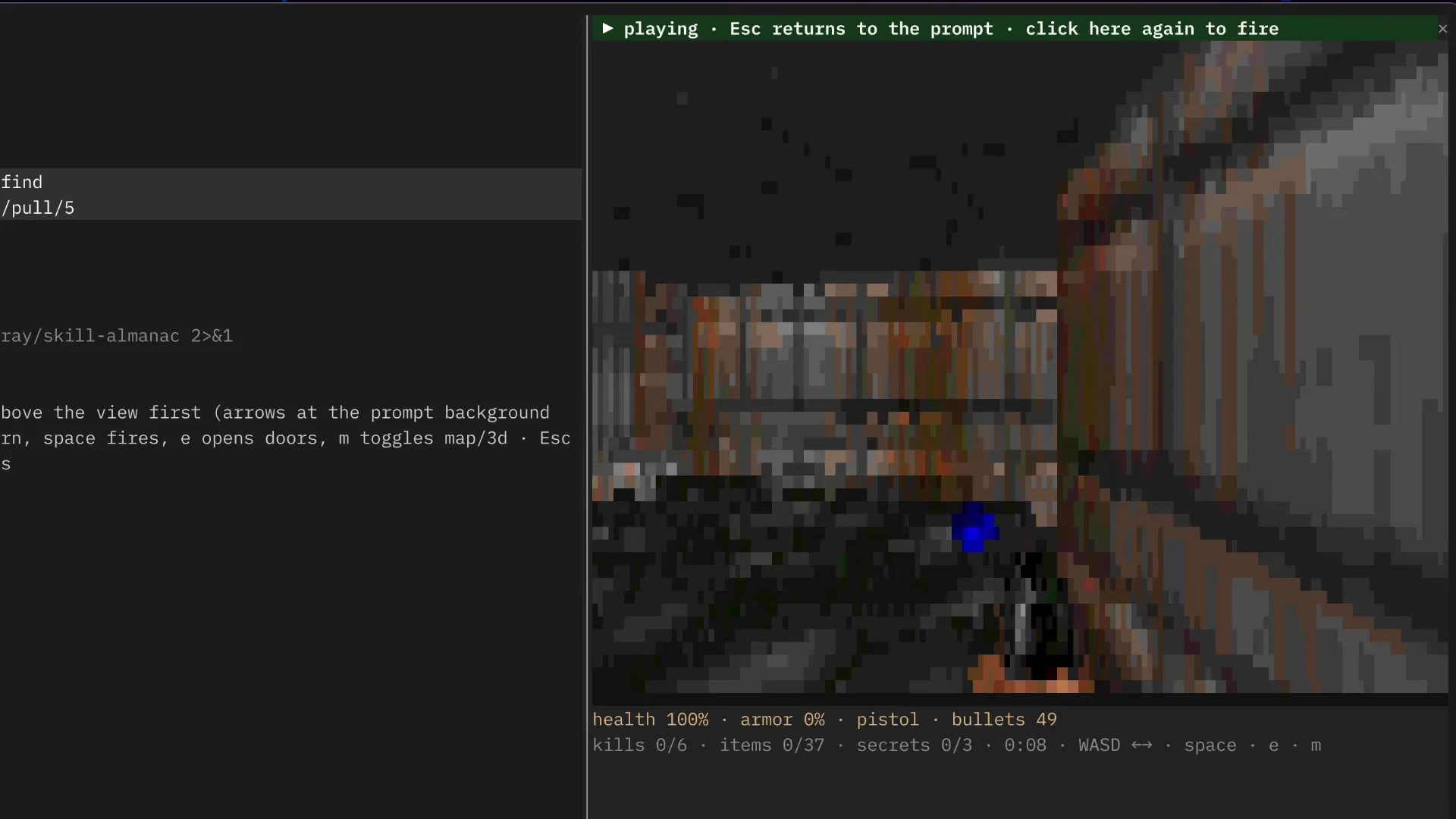
A game drawn this way costs no extra tokens. It runs locally while Claude keeps working on its task, and nothing is sent to the model.
How are Claude Mods different from regular Claude Code hooks?
A regular Claude Code hook, now called a settings hook, runs outside Claude Code on a lifecycle event. A command hook launches a separate program, while HTTP and prompt hooks call out to a server or a model. Claude Code waits for the result. A mod's function hook is code that runs inside Claude Code's own process.
Running outside Claude Code is what made settings hooks safe. If the script crashes, nothing happens to Claude Code, because the script was never part of it. Function hooks give up that isolation in return for reach.
| Settings hook | Claude Code mod (function hook) | |
|---|---|---|
| What runs | A shell command, HTTP request, or prompt | A TypeScript or JavaScript function |
| Where it runs | Outside Claude Code: a subprocess, HTTP call, or model call | Inside Claude Code's own process |
| Configured in | settings.json | A plugin's hooks/hooks.json modules entry |
| Can draw in the interface | No | Yes: panes, a band above the prompt, the spinner |
| Can rewrite the event | A tool call's arguments and result, or context for Claude | The event itself, before it continues |
Ordering matters once you run more than one mod. Earlier mods wrap later ones, and each hook receives a next function and decides whether to call it, like middleware in Express. Calling next(e) passes the event on, calling it with a changed copy rewrites it, and returning without it answers the event yourself.
The Claude Code hooks reference covers settings hooks in full.
Do you still need a feature flag to use Claude Mods?
No. During early access, Claude Code only loaded function hooks when the CLAUDE_CODE_ENABLE_FUNCTION_HOOKS environment variable was set. You could set it in the shell or in the Claude Code settings file. Claude Code v2.1.287 added Claude Mods to the changelog and turned them on by default, and that version and later ones ignore the variable.
If you added CLAUDE_CODE_ENABLE_FUNCTION_HOOKS to ~/.claude/settings.json on an earlier version, take it out. Setting it to 0 does not switch mods off on current versions.
Check your version in a shell:
claude --versionTo turn mods off, disable the mod's plugin in /plugin, start a session with --safe-mode, or set "disableAllHooks": true in ~/.claude/settings.json. That last setting stops your settings hooks and custom status line too.
How to build a Claude Code mod by asking Claude
The fastest way to build a Claude Code mod is to describe it in a Claude Code session. Claude Code ships a built-in plugin-authoring skill for this. It tells Claude which events and methods your version has, where to write the mod, and how to load it. Claude writes the files, and you approve hot reloading so the mod runs in that session.
-
Describe the mod in plain words, for example:
make a mod that shows the current git branch above the prompt
-
Approve each file. Claude writes the mod under
~/.claude/dev-mods/<session-id>/, which is a protected path in the default permission mode. -
Choose Enable for this session when Claude Code asks about hot reloading.
-
Check it loaded by running
/pluginand opening the Installed tab.
You now have a working mod that reloads at the end of every turn that changes it. A mod Claude writes this way only loads in the session that made it, so copy its folder somewhere permanent to keep it.
Claude does better with examples to copy. Point it at the built-in mods in the claude-code repository, which hold the source of the /diff pane, the AGENTS.md loader, and two more. Anthropic also posted a mods cheat sheet in the Sep 9 update on GitHub issue #91870. It lists the hook forms and the $ API on one page.
How to build a Claude Code mod by hand
A hand-written Claude Code mod is three files: a plugin manifest, a hooks.json file that names the code file, and the hooks module itself. Claude Code loads TypeScript files directly, so there is no build step, bundler, or package install. The demo below adds a hello command that toggles a red banner above the prompt.
demo/
├── .claude-plugin/
│   └── plugin.json
├── hooks/
│   ├── hooks.json
│   └── register.tsx
└── tsconfig.json
The manifest is a normal plugin manifest. Mods add no required fields to it. In .claude-plugin/plugin.json:
{
  "name": "hello-mod",
  "version": "0.1.0",
  "description": "The smallest useful Claude Mod: /hello draws a line of text above the prompt.",
  "author": {
    "name": "Richard"
  }
}
The modules key in hooks.json is what turns the plugin into a mod. It holds one path, relative to the hooks.json file. In hooks/hooks.json:
{
  "description": "hello-mod: registers /hello and draws a line above the prompt.",
  "modules": ["./register.tsx"]
}
The hooks module exports a register function. Claude Code calls it once when the mod loads and passes it on, which registers a hook for a named event:
// hooks/register.tsx

import type { Register } from 'claude-code'

let showing = false;

export const register: Register = on => {
  on('session.start', async ($, e, next) => {
    const result = await next(e);

    await $.command.register({
      name: 'hello',
      description: 'Show or hide a hello banner above the prompt',
    });

    return result;
  });

  on('command.run', { command: 'hello' }, async ($, e) => {
    showing = !showing;

    $.ui.invalidate('ui.render');

    return { text: showing ? 'banner shown' : 'banner hidden' }
  });

  on('ui.render', { component: 'AbovePrompt' }, async ($, e, next) => {
    if (!showing) return next(e);

    const { Box, Text } = await $.ui.resolve(e);

    return (
      <Box flexDirection="column">
        <Text color="red">Hello from a Claude Mod</Text>
        {await next(e)}
      </Box>
    );
  })
}
Every hook receives the same three arguments. $ is the mods API, the only door a mod has to the outside: commands, drawing, files, processes, and the network all go through it. e is the event as frozen plain data, and next passes the event on to later mods and then to Claude Code's own behavior.
The session.start hook lets the session start, then registers /hello. The command.run hook has a matcher, { command: 'hello' }, so it only runs for that command. It flips showing, asks for a redraw with $.ui.invalidate, and returns the text printed in the transcript without calling next.
The ui.render hook targets AbovePrompt, the band between the transcript and the prompt box. When the banner is off it returns next(e) untouched. When it's on, it gets Box and Text from $.ui.resolve(e). It then wraps Claude Code's own band content in a column with the red line on top.
The demo's tsconfig.json sets "jsx": "react" with "jsxFactory": "h", and includes .claude/types, where the /plugin-types command wrote type declarations when the demo was built on v2.1.274. Current versions write them to .claude-plugin/types/ inside the mod each time it loads. Load the folder for one session with claude --plugin-dir ./demo.
How does hot reload work when you build a Claude Code mod?
Claude Code watches a mod folder loaded with the plugin-dir flag, and any mod Claude wrote in the current session. When a file changes, Claude Code reloads the hooks module and runs its register function again, without a restart. In the demo, saving the hooks module printed a reload line listing the mod's 3 hooks, and the next hello command used the new code.
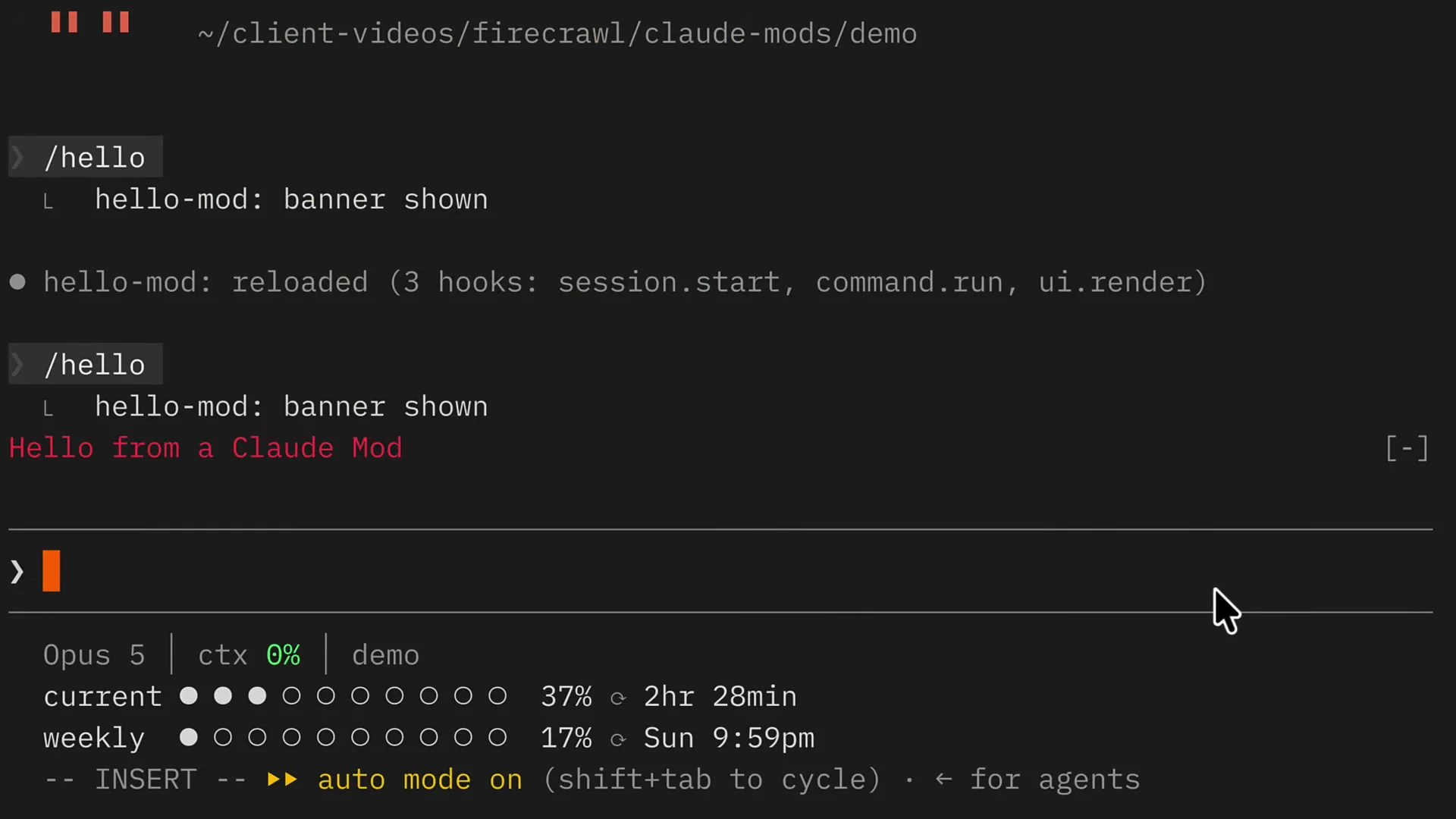
The reload line doubles as a check. If a hook you wrote is missing from that list, Claude Code never registered it, usually because of a misspelled event name.
A reload runs register from scratch, so module-level variables like showing reset. Use $.state for values that should survive a reload. Run claude plugin validate ./demo to see what Claude Code reads from your mod without loading it. It prints a hooks: line with each event and matcher, and a calls: line with every mods API method.
Why can't a Claude Code mod import npm packages?
A Claude Code mod can't import npm packages because Claude Code has to read the whole mod and list everything it does before it runs. A hooks module may import only its own files by relative path, plus Claude Code's own module for types and helpers. One npm import would pull in code Claude Code can't inspect.
The security model depends on that list. A mod has no ambient file system or network access: it can't call Node's fs or fetch directly. To read a file, start a process, or make a request, it calls $.fs, $.process, or $.http. Static analysis can then name every side effect, which is what claude plugin validate prints and what an administrator reviews.
A dependency breaks that. Claude Code would need to know what the package does, what its own dependencies do, and so on, before the mod runs. The exception in practice is a small, pure, self-contained library with no dependencies of its own. It has to be an ES module, a file that uses import and export, copied into the plugin folder.
| Rule | What it means for your mod |
|---|---|
| No npm or React packages | Interface elements like Box, Text, and Button come from $.ui.resolve(e), not from an import |
| Relative imports only | Split code across your own files, as in import { meter } from './lib.ts' |
No ambient fs or network | Use $.fs, $.http, and $.process, which validation lists |
| No WebAssembly | Anything compiled to WASM has to run in a separate process or be rewritten |
| ES modules only | import declarations at the top of the file, no require and no dynamic import() |
A hook also returns a description of what to draw rather than mounting React components itself. Claude Code turns that description into the terminal or Desktop view. If a tree uses an element the app doesn't support, Claude Code draws its own version instead.
How did DOOM end up running inside Claude Code?
DOOM runs inside Claude Code as a mod that draws frames above the prompt while Claude works. The first version, a pull request on the cc-arcade mod, runs the original 1993 engine in a separate process and fetches frames over localhost. We built a second version that rewrites DOOM in plain TypeScript instead, so it runs inside the mod.
The community build had to work around two limits. The mod environment has no WebAssembly, the compiled binary format that the engine build used. So the engine runs under Bun or Node, and the mod reaches it with $.http.fetch. And Claude Code throttled redraws of the band above the prompt to about ten a second, which set the frame rate.
Our TypeScript version started from a refusal. Claude first said a playable DOOM wasn't possible inside a mod, because of those limits. Fable, Anthropic's model, then found a way around them by searching the Firecrawl developer index. It wrote the whole game in TypeScript, with health, armor, ammo, and kills drawn as a line of text under the view.
The Firecrawl developer index is a search index built for coding agents. It covers issues, merged pull requests, and READMEs from public GitHub repositories plus curated documentation sites, over 70 million artifacts in total. That is the kind of source where undocumented limits like these get written down first, in an issue comment rather than a docs page.
Also read: How to fix Claude Code's design skill with Firecrawl, another build where the developer index changed what Claude wrote.
How to track Firecrawl credits with a Claude Code mod
A credit-tracker mod shows how many Firecrawl credits each command used, under the spinner, while Claude is still working. In our test session, four developer index searches cost 8 credits. That brought the session to 10 credits, with 1,203 left on the account. Drawing it cost no tokens, because the mod draws locally.
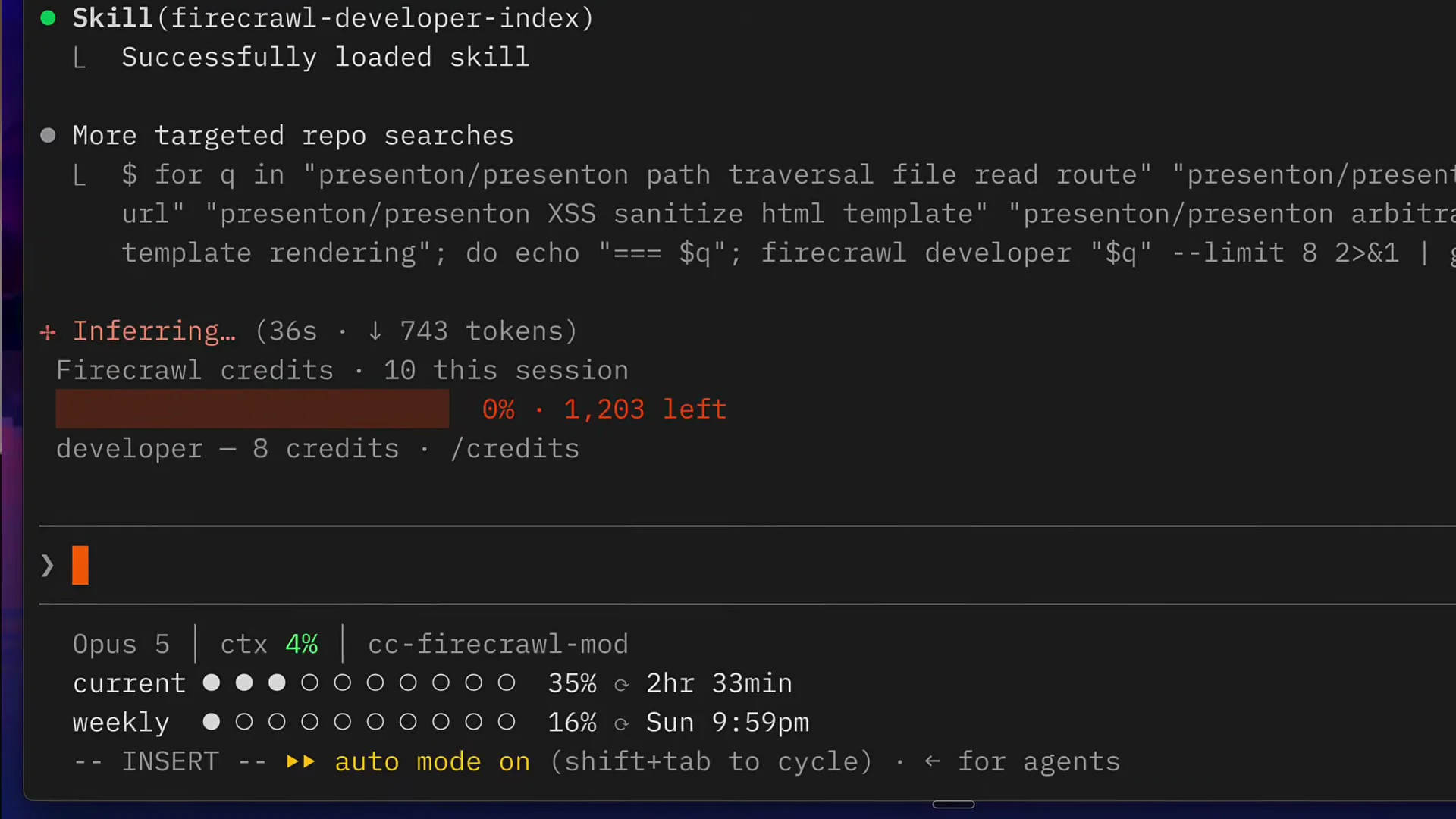
The mod in the screenshot is open source as firecrawl-credits-mod on GitHub. It hooks Claude's Bash tool calls and picks out the ones that run the firecrawl CLI. It reads each command's cost from the creditsUsed field in the command's JSON output. When a command prints no JSON, it falls back to the drop in the account balance and marks the figure with a ~.
git clone https://github.com/RichardBray/firecrawl-credits-mod
claude --plugin-dir ./firecrawl-credits-mod
The mod reads the balance with firecrawl credit-usage --json, so it never handles the API key itself. Typing /credits prints the session total.
| Measure from the test session | Value |
|---|---|
| Developer index searches | 4, each with --limit 8 |
| Credits for those searches | 8 |
| Firecrawl credits used this session | 10 |
| Credits left on the account | 1,203 |
The 8 credits match Firecrawl's pricing for developer search, 2 credits per 10 results with any partial ten rounded up. Each query asked for at most 8 results, so each cost 2 credits.
The searches ran through the Firecrawl CLI, one firecrawl developer call per query:
firecrawl developer "presenton/presenton XSS sanitize html template" --limit 8Developer search is one of three Firecrawl search surfaces. Web search returns pages from the open web, and /scrape turns one known URL into clean markdown. The developer index answers code questions from issues, pull requests, and docs. A mod like this one is a cheap way to see which of them a long agent run actually leans on.
Do you need a Firecrawl API key to use the developer index from Claude Code?
No. Firecrawl's developer search endpoint accepts keyless requests on Firecrawl Cloud, capped per IP address per day on both requests and credits. Signing up for a free API key lifts that cap and adds 1,000 free credits. A credit tracker like the one above only has a balance to show once you're signed in.
Install the CLI and the developer index skill for Claude Code in one command:
npx -y firecrawl-cli@latest setup developer-indexThe developer index docs cover the HTTP endpoint and its filters, and the rate limits page lists the keyless allowances. If you'd rather connect over MCP, the Firecrawl MCP server exposes the same index. Our breakdown of how Claude Code spends tokens on web research covers the search side of the same bill.
When should you use pi extensions instead of Claude Mods?
Use pi extensions when your idea needs npm packages, direct file system access, or WebAssembly. Pi is an open-source terminal coding agent. Its extensions are TypeScript packages that can do all three, so a pi DOOM port could load a WebAssembly engine directly. Use Claude Code mods when you want the extension inside Claude Code, reviewable before it runs.
| Claude Code mods | Pi extensions | |
|---|---|---|
| Language | TypeScript or JavaScript | TypeScript |
| npm packages | No | Yes |
| File system and network | Only through $.fs, $.http, and $.process | Direct, through Node |
| WebAssembly | No | Yes |
| Distribution | Claude Code plugin marketplaces | npm, listed on pi.dev |
| Reviewable before running | Yes, with claude plugin validate | No equivalent |
The restriction is the trade. Mods are less flexible than pi extensions, and in return a team or an administrator can see exactly what a mod touches before it loads. pi-doom imports node:fs and loads a WebAssembly build of the engine, which a Claude Code mod can't do.
For more Claude Code mods to learn from, the comments on issue #91870 are still the best index. They include cc-arcade, with Tetris and seven other games, its DOOM pull request, and a terminal browser mod. The Create a mod guide and mods reference cover every event and limit.
A Claude Code mod is a plugin with a hooks module and fast hot reload. Its no-dependency rule is what lets Claude Code show you everything it does before it runs.
Check out the Firecrawl docs to go deeper.
Frequently Asked Questions
What is the difference between a Claude Code mod and a plugin?
A mod is a plugin. The only addition is a modules entry in the plugin's hooks/hooks.json that points at a JavaScript or TypeScript file. Claude Code calls the register function in that file, and the functions it registers run inside Claude Code's own process.
Do I still need CLAUDE_CODE_ENABLE_FUNCTION_HOOKS=1 to use Claude Code mods?
No. The flag was only needed during early access. Mods are on by default from Claude Code v2.1.287, which ignores the variable, so remove it from your shell profile or settings.json and update Claude Code instead.
Can a Claude Code mod use npm packages or React components?
No. A hooks module may import only its own files by relative path, plus the claude-code module for types and helpers. Interface elements such as Box and Text come from Claude Code itself, so there is nothing to install.
Does running a Claude Code mod use tokens?
Not by itself. A mod is local code that Claude Code calls on events such as a tool call or a redraw, so a game or a counter drawn above the prompt sends nothing to the model. Tokens are only spent if the mod calls a model through the mods API.
Can you play DOOM in Claude Code?
Yes, as a mod. A community build in the cc-arcade repository runs the original 1993 engine in a separate process and draws its frames above the prompt. Another version rewrites the game in plain TypeScript, because the mod environment has no WebAssembly.
Where can I find example Claude Code mods to learn from?
Anthropic publishes the source of its built-in mods, such as the /diff pane, in the mods folder of the claude-code GitHub repository, and sample mods in the claude-code-playground repository. Community projects are collected in the comments of GitHub issue #91870, where function hooks were first proposed.
Is it safe to install someone else's Claude Code mod?
Treat it like any code you run. A mod is not sandboxed and acts with your permissions through the mods API. Run claude plugin validate on its folder first: the output lists every event the mod handles and every API call it makes, without running it.