TL;DR
Codex's built-in web search queries a stale pre-scraped index by default, silently fabricates results when the network is restricted, caps you at 4 queries per call, and returns snippets with no full-page content. Switching to Firecrawl fixes all of it: live results, full markdown pages, crawling, and domain/time filtering, wired directly into Codex as native MCP tools. Two config lines to set up, one line to disable the broken default, or skip the config entirely with the official Firecrawl plugin. The plugin and MCP server also give Codex Firecrawl Alexandria, the knowledge library for superintelligence: 400+ official data providers plus Firecrawl's Developer, Research, and Government indexes, for answers that were never on a web page in the first place.
| Codex web search | Firecrawl (CLI / MCP / API) | |
|---|---|---|
| Data freshness | Pre-scraped cache, no SLA | Live, real-time results |
| JavaScript rendering | Browser-backed but a black box (no waitFor, no viewport, no action control) | Full control (waitFor, actions array, mobile emulation) |
| Queries per call | Hard cap of 4 | Unlimited |
| Full-page content | Snippets only | Full markdown per page |
| Time and domain filtering | Not supported | Past day/week/month, restrict to any domain |
| Site crawling and URL discovery | Not supported | /crawl with depth and regex, /map for sitemap |
| Batch scraping (parallel URLs) | Not supported (one URL at a time) | /batch/scrape |
| Structured extraction with a schema | Not supported (prose with citations) | JSON schema extraction, typed output |
| Browser actions (click, fill, scroll) | Not supported | /interact stateful sessions |
| Authenticated / logged-in scraping | Not supported | Session profiles hold cookies and auth |
| Prompt injection guard on extraction | Not supported | checkPromptInjection classifier + HTTP 403 |
| Change tracking (diff across scrapes) | Not supported | changeTracking format |
| PDF and DOCX parsing | Inconsistent PDF, no DOCX | Both, HTTP or local |
| Screenshots and page PDFs | Not supported | screenshot, pdf formats |
| Developer and Research indexes | Not supported | Developer Index (63.1% Recall@10 on DevDex), Research Index (arXiv, GitHub, papers) |
| Official data providers | Not supported | Firecrawl Alexandria: 400+ providers (package registries, GitHub, SEC EDGAR, FRED, and more) |
| Programmatic access outside the agent | Not available (Codex-only tool) | REST API, SDKs (TypeScript, Python, Go, Rust), MCP |
| Webhooks and async jobs | Not supported | Crawl and batch webhooks |
| Silent failures | Fabricates results silently | Explicit errors |
| Setup required | None (on by default) | One-click plugin, or ~2 lines in config.toml |
I was auditing a dependency update with Codex and asked it to pull the latest changelog for a library. It came back with version numbers, migration steps, deprecation notices. Confident and detailed. Every single thing was wrong.
The library had shipped a major breaking change three weeks earlier. Codex had no visibility into that. No warning, no timestamp, no caveat. It just answered from whatever was in the cache.
The web_search tool did fire. That's the important part. This wasn't the model making things up from training data. Codex queried its search tool, got results back, and reasoned from them accurately. The problem is that Codex's default search mode queries a pre-scraped index maintained by OpenAI, not the live web. The model received stale data and produced a correct-looking answer from it. The failure is at the data layer, not the model layer.
That distinction matters because it changes how you fix it. You don't need a better prompt. You need a different data source. This guide covers how Codex web search works in both the CLI and the desktop app, where its limits are, and how to wire in Firecrawl to get live results, full-page content, and actual crawling.
What is Codex?
Codex is OpenAI's AI-powered coding agent, available as a CLI and a desktop app. It runs tasks in a sandboxed environment with access to your filesystem, shell, and external tools (including web search). It's designed for multi-step developer workflows: dependency audits, migration assistance, documentation lookups, and automated code changes.
How does web search work in Codex CLI?
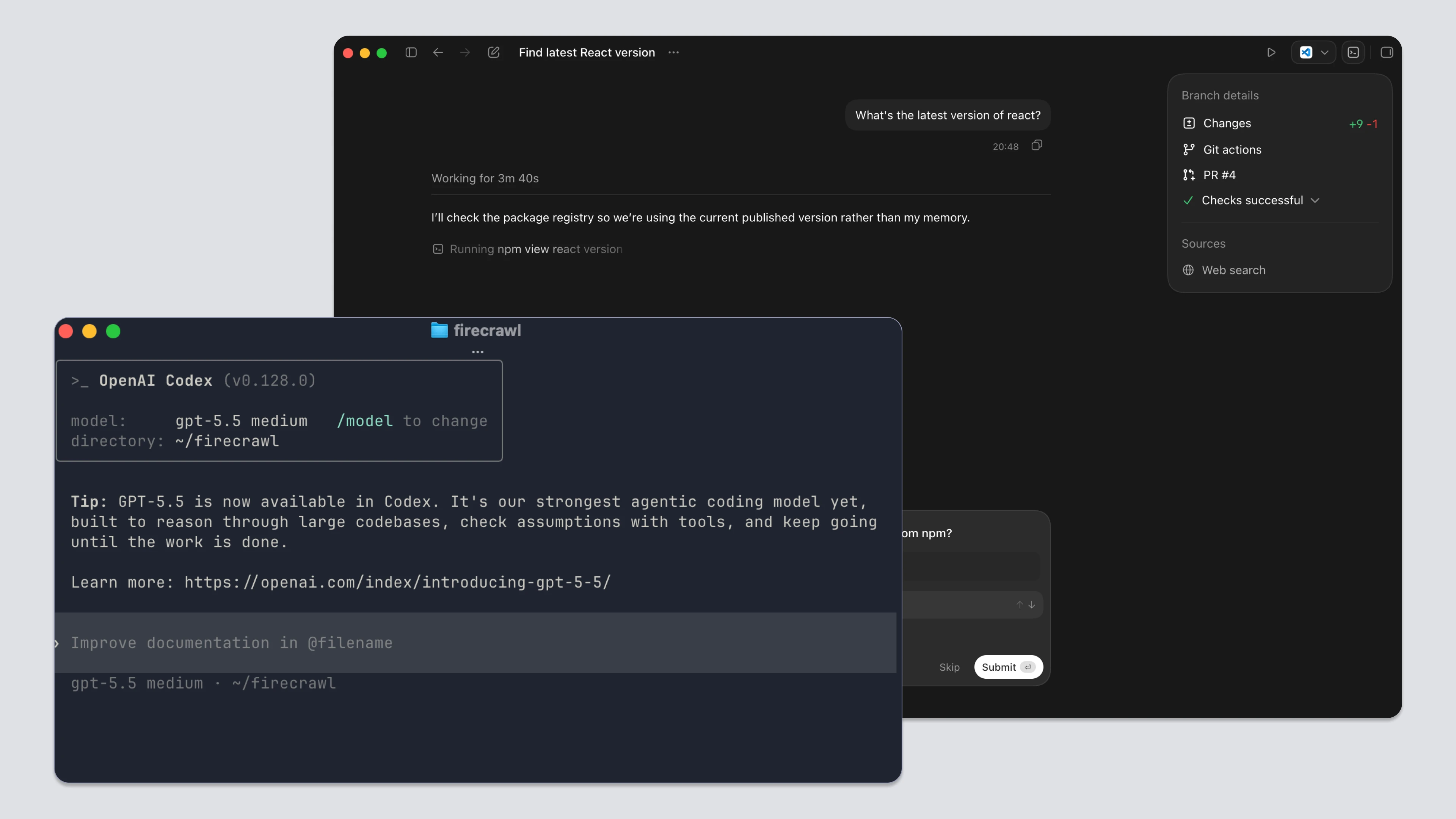
Codex CLI ships with web search enabled by default (see Can Codex CLI do web search? How to enable it? for a quick primer). It runs in two modes.
Cached mode queries an OpenAI-maintained pre-scraped index. Results come back fast. But they reflect whenever OpenAI last crawled that page. No freshness indicator is shown to you or to the model. This default catches many developers off guard (see Why can't my Codex CLI Agent browse the web? for the short version).
Live mode fetches real-time results. It requires explicit opt-in.
You configure this in ~/.codex/config.toml:
web_search = "cached"    # default
web_search = "live"      # real-time
web_search = "disabled"  # off
Or at the CLI level for a single session:
# Live results for this session only
codex --search "React 19 breaking changes"

# Full sandbox access mode, also enables live search
codex --yolo "research the Next.js 15 changelog"
One useful detail from the CLI reference: web search activity shows up in session transcripts and in codex exec --json output as web_search items. You can audit exactly what got fetched.
How does web search work in the Codex App?
The Codex desktop app shares the same web search behavior as the CLI. There is no longer a dedicated web search toggle in the App UI. Configuration goes through ~/.codex/config.toml, which both the App and the CLI read from the same file.
The same three modes apply: cached (default), live, and disabled.
web_search = "cached"  # default; serves results from the web search cache
# web_search = "live"  # fetch the most recent data from the web (same as --search)
# web_search = "disabled"
One shortcut still works: running with full sandbox access automatically switches web search to live results.
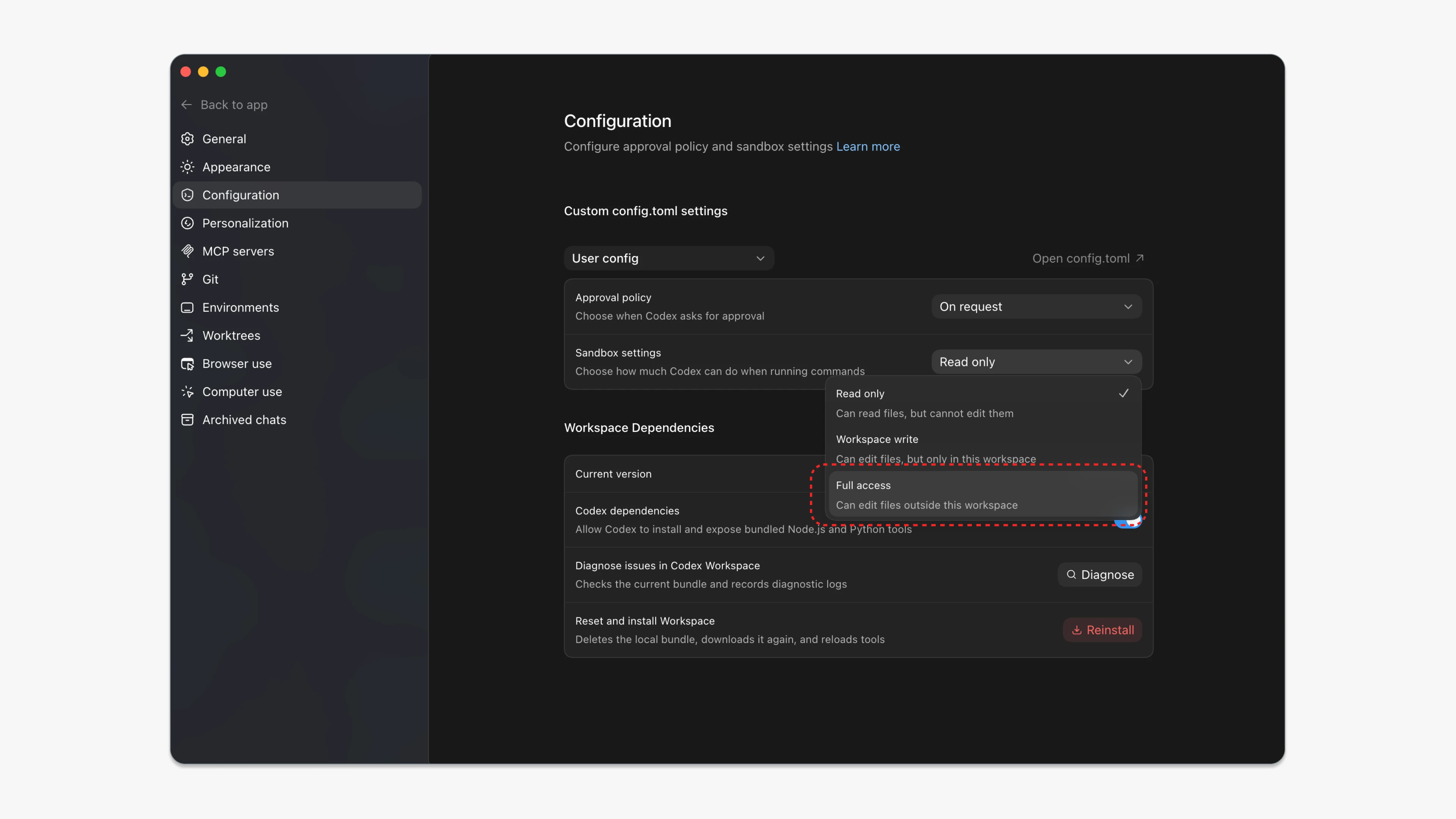
Both the CLI and the App share one hard boundary. Web search can't reach authenticated pages. No signed-in sessions, cookies, browser extensions, or existing tabs. That's a sandbox-level constraint, not a bug. The App's browser tool handles those cases separately.
What are Codex's web search limitations?
The feature works. But it has real gaps that matter for development workflows:
- Results come from a pre-scraped cache with no freshness guarantee
- Codex can silently fabricate search results when network access is restricted
- Each call is capped at 4 queries regardless of task complexity
- Search returns snippets only: no full-page content
- There's no domain filtering, time filtering, or source selection of any kind
Why are cached results unreliable?
The cache has no SLA on freshness. For a developer checking a library's latest release, a framework's current migration guide, or whether a known bug was patched, the cache can be months behind. You're not just working with a model that has a training cutoff. You have two independent stale layers presenting as current knowledge. That's an LLM grounding problem, not a prompting one.
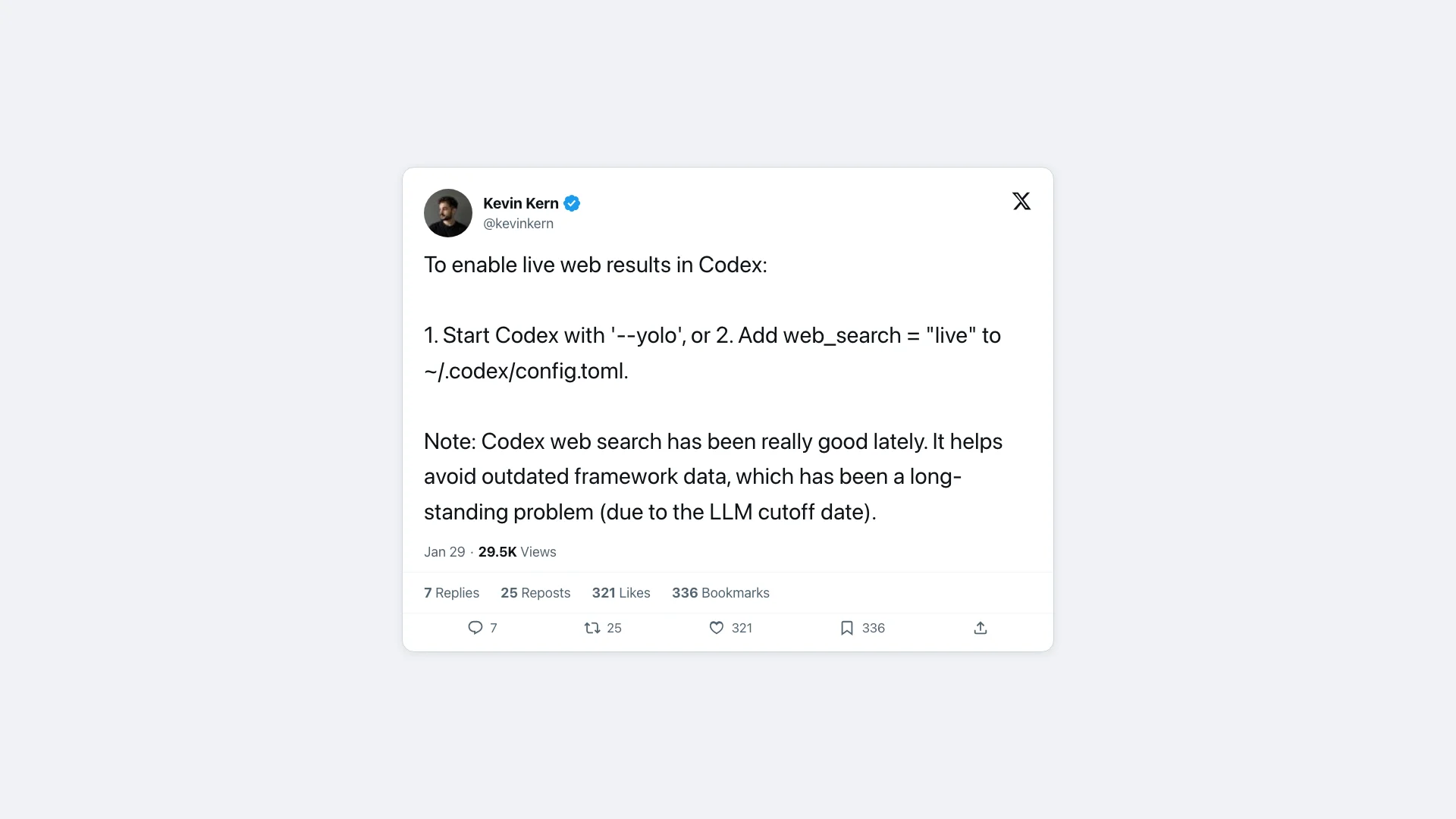
Kevin Kern, a developer who regularly documents Codex tips, framed live search as a workaround for "a long-standing problem due to the LLM cutoff." Even in community documentation, staleness is treated as a known condition. Not an edge case.
Why does Codex hallucinate silently when the network is restricted?
GitHub issue #5092 documents this in detail.
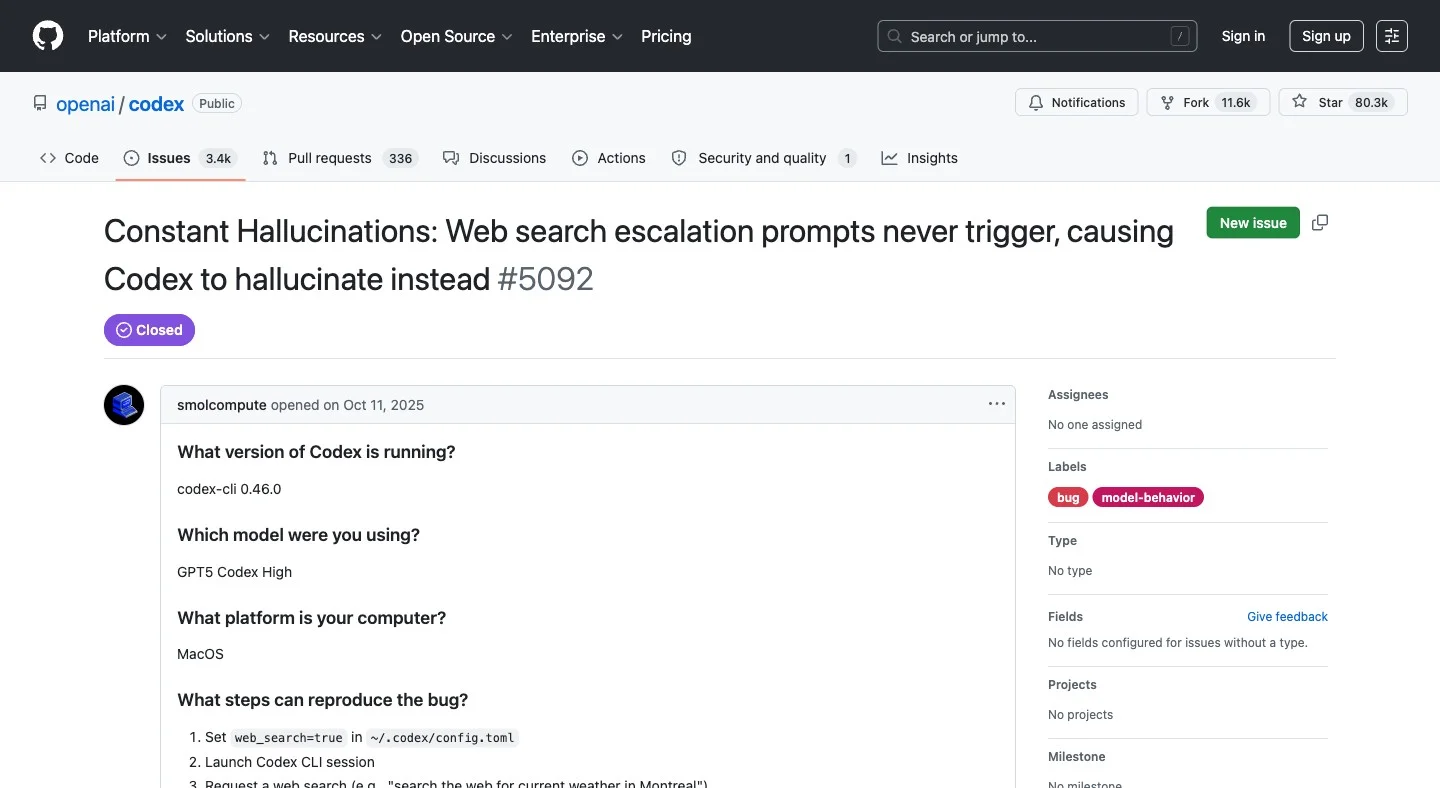
When sandbox network access is restricted, which happens in many default configurations, the escalation prompts that should request network permission never fire.
Instead of throwing an error, Codex "spins in circles attempting alternative approaches" and eventually fabricates a response. It presents invented data as search results. No warning. No error. No indication the search didn't happen.
The proposed fix was simple: fail fast with an explicit error. It was not accepted. This behavior is current.
This is distinct from the staleness issue. It's not that the results are old. No results were fetched at all.
Why is there a hard cap of 4 queries per call?
GitHub issue #7132 lays this out plainly.
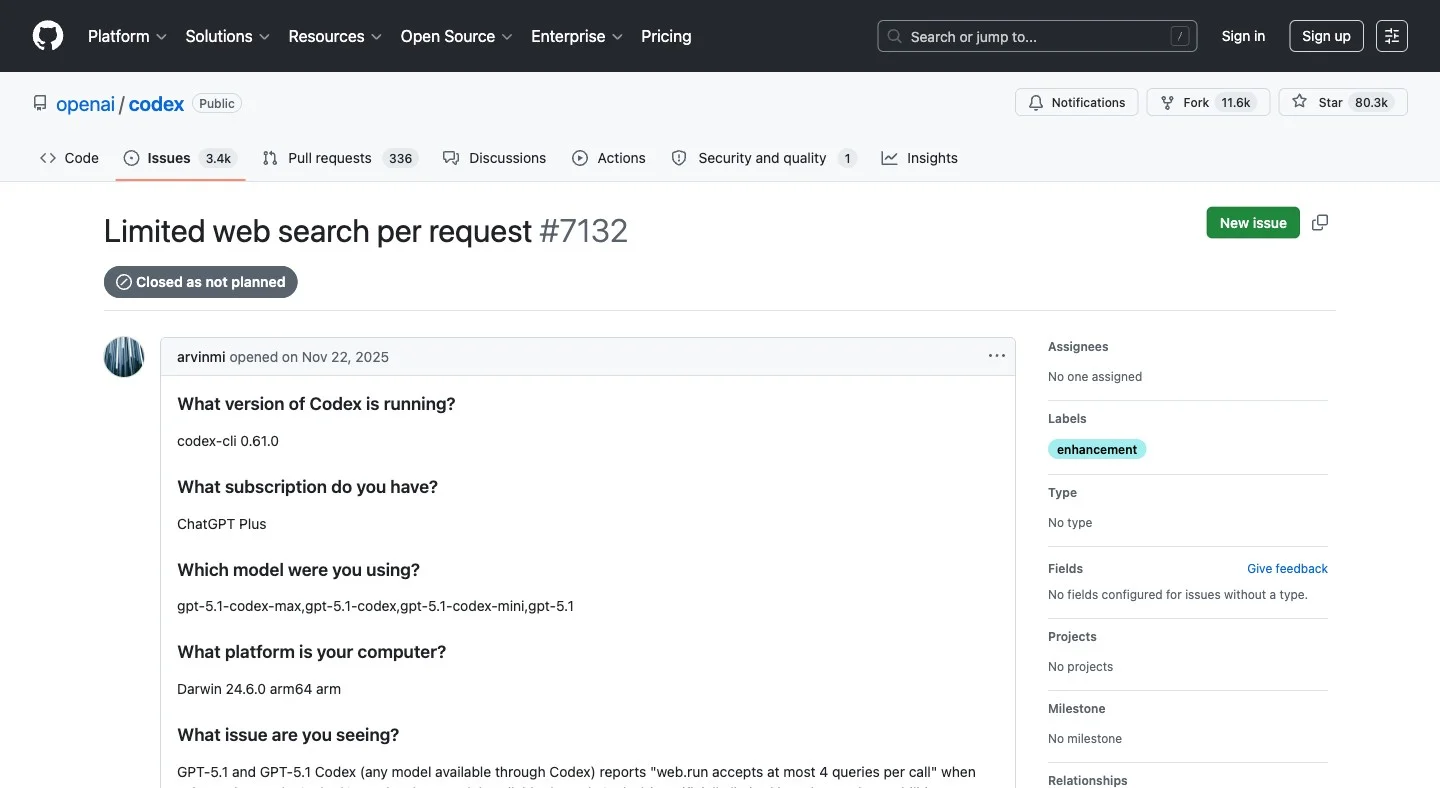
Each web.run invocation accepts at most 4 queries. A task checking multiple libraries, comparing changelogs, and gathering migration context needs far more than 4 lookups.
OpenAI closed this issue as "not planned." The reporter noted that Claude Code and ChatGPT do extensive multi-round web investigation. Codex forces batching at 4, adding call overhead and generating session traces that are long and hard to review.
Why does Codex return snippets instead of full pages?
Search returns titles and snippets. Not the actual page. If Codex needs to read the content it found, it requires a separate step. There's no integrated search-and-scrape in a single call. For documentation work specifically, this is the main gap (covered in How do I get Codex to fetch webpages for documentation?).
What filtering options does Codex search support?
You can't restrict results to a specific domain. You can't ask for results from the past week. No news search. No GitHub repo search. No academic paper search. One mode, one source type, no controls.
Here's a quick summary:
| Feature | Codex built-in search |
|---|---|
| Works out of the box | ✓ |
| Visible in session transcripts | ✓ |
| Live, fresh results | ✗ Cached by default |
| Reliable when network is restricted | ✗ Can hallucinate silently |
| Unlimited queries per call | ✗ Hard cap of 4 |
| Full-page content retrieval | ✗ Snippets only |
| Domain or time filtering | ✗ Not supported |
| Site crawling | ✗ Not supported |
Better Web Search and Extraction: How do I integrate Firecrawl with Codex?
What is Firecrawl?
Firecrawl is the web data API to search, scrape, and interact with the web at scale. Search finds relevant live sources fast. Scrape turns them into clean, token-efficient markdown or structured JSON. Crawl, Map, and Interact handle depth, structure, and dynamic pages.
Search finds the right source. Scrape turns it into clean, usable context. The full workflow runs through one API, a CLI, or an MCP server that agents like Codex call as native tools.
Firecrawl is used by 1.25M+ developers and non-developers across 150,000+ companies, and has served 5B+ requests to date. It has reached that scale because it handles the full workflow (search, scrape, crawl, interact) in a single install, on the real web. Builders who need reliable web context for agentic workflows keep coming back to it, and recommend it to others. Peter Steinberger, founder of OpenClaw, put it plainly:
Get your free Firecrawl API key →
The quickest way to bring Firecrawl into Codex is the official plugin. If you want more control, there are two other ways: the CLI for direct terminal control, and MCP for agent-native use inside tasks. If you're deciding between the two, MCP vs. CLI for AI agents covers the tradeoffs in depth. I'll cover both, plus how to configure MCP in the Codex App.
The fastest path: the official Firecrawl plugin
Firecrawl is an official plugin in the ChatGPT plugin directory, which Codex shares with ChatGPT, so one install covers both. Open Plugins in Codex, search for Firecrawl, install it, and connect your Firecrawl account when prompted. There's no API key to paste and no config.toml to edit.
The plugin ships with Firecrawl's skills built in, so Codex already knows when to search live, when to scrape a page in full, and when to crawl a docs site. It also includes Firecrawl Alexandria and the Developer Index, covered below. Pair it with web_search = "disabled" in your config so Codex stops reaching for the cached index.
Prefer to wire it up yourself? The CLI and MCP options below give you the same tools with more control over configuration.
Option 1: Firecrawl CLI for direct control
The Firecrawl CLI is a standalone tool you run from the terminal. It's useful for pre-task research, one-off lookups, and any situation where you want to see exactly what's being fetched before handing it to Codex.
Install and authenticate:
npx -y firecrawl-cli@latest init --all --browser
export FIRECRAWL_API_KEY=fc-YOUR_API_KEY
Get your key from firecrawl.dev/app/api-keys.
Live search with full-page content in one call:
firecrawl search "React 19 migration guide" --scrape --scrape-formats markdown --limit 3Codex cached mode returns a snippet with no content and no age indicator. Firecrawl returns live results plus full markdown for each page. Same query, very different output.
Time-filtered search for catching recent changes:
# Breaking changes shipped in the past week
firecrawl search "Next.js 15 breaking changes" --tbs qdr:w --scrape --scrape-formats markdown

# Past 24 hours for incident monitoring
firecrawl search "Vercel outage" --tbs qdr:d --type news
Domain-restricted search:
# Only results from nextjs.org
firecrawl search "app router middleware" --include-domains nextjs.org --limit 10
Crawling when you don't know which page has the answer:
# Discover all URLs on a docs site first
firecrawl map https://nextjs.org/docs

# Then crawl what you need
firecrawl crawl https://nextjs.org/docs --limit 100
After the dependency audit incident I described at the top, I started doing this before every major upgrade. Map the docs site. Crawl the relevant pages. Drop them into the Codex session as context. Zero stale data in the conversation.
Ready to try it? Sign up for Firecrawl free. Your first credits are included.
Option 2: Firecrawl MCP in Codex CLI
The Firecrawl MCP server is where Codex gains live search and full-page retrieval as built-in tools.
Instead of running searches manually, Codex calls Firecrawl autonomously as part of a task. The agent gains firecrawl_search, firecrawl_scrape, firecrawl_crawl, and more as native tools it can invoke on its own.
If you want to explore how Firecrawl MCP fits alongside other MCP servers for developers, that guide covers the full ecosystem.
The official GitHub repo has first-party support for Codex CLI configuration. For a broader comparison of web search MCP servers, including Tavily and Exa alongside Firecrawl, that post covers setup and trade-offs.
One-command setup:
codex mcp add firecrawl --env FIRECRAWL_API_KEY=fc-YOUR_API_KEY -- npx -y firecrawl-mcpOr add it manually to ~/.codex/config.toml:
[mcp_servers.firecrawl]
command = "npx"
args = ["-y", "firecrawl-mcp"]

[mcp_servers.firecrawl.env]
FIRECRAWL_API_KEY = "fc-YOUR_API_KEY"
Verify it's active:
codex mcp list
# firecrawl should appear
Optional but recommended: disable built-in search to avoid overlap:
web_search = "disabled"

[mcp_servers.firecrawl]
command = "npx"
args = ["-y", "firecrawl-mcp"]

[mcp_servers.firecrawl.env]
FIRECRAWL_API_KEY = "fc-YOUR_API_KEY"
With this configured, here's what Codex handles autonomously:
"Check the React 19 upgrade guide and list any deprecated hooks"
  Codex calls firecrawl_search + firecrawl_scrape, reads full docs, answers accurately

"Crawl the Prisma docs and find every page mentioning connection pooling"
  Codex calls firecrawl_map, then firecrawl_crawl

"What changed in Tailwind v4 versus v3? Get the actual release notes."
  Codex calls firecrawl_search with a time filter, returns current changelogs
The MCP server exposes 14 tools in total. The ones most relevant for development work:
| Tool | What Codex uses it for |
|---|---|
firecrawl_search | Web research, replaces built-in search |
firecrawl_scrape | Extracting a URL as clean markdown, including JS-rendered and SPA pages |
firecrawl_crawl | Indexing an entire docs site |
firecrawl_map | Discovering all URLs on a site |
firecrawl_extract | Pulling structured data with a JSON schema |
firecrawl_agent | Autonomous multi-page research |
Option 3: Firecrawl MCP in the Codex App
The Codex App reads the same ~/.codex/config.toml as the CLI. If you've already added the MCP config above, the App picks it up. No extra setup needed.
For those who prefer the UI path (similar to setting up Firecrawl MCP in Cursor):
- Open the Codex App
- Go to Settings then MCP Servers
- Add server: command
npx, args-y firecrawl-mcp - Add env var:
FIRECRAWL_API_KEYwith your key - Save and start a new session
Or you can simply use Firecrawl's streamable HTTP URL to set up the MCP client.
https://mcp.firecrawl.dev/{FIRECRAWL_API_KEY}/v2/mcp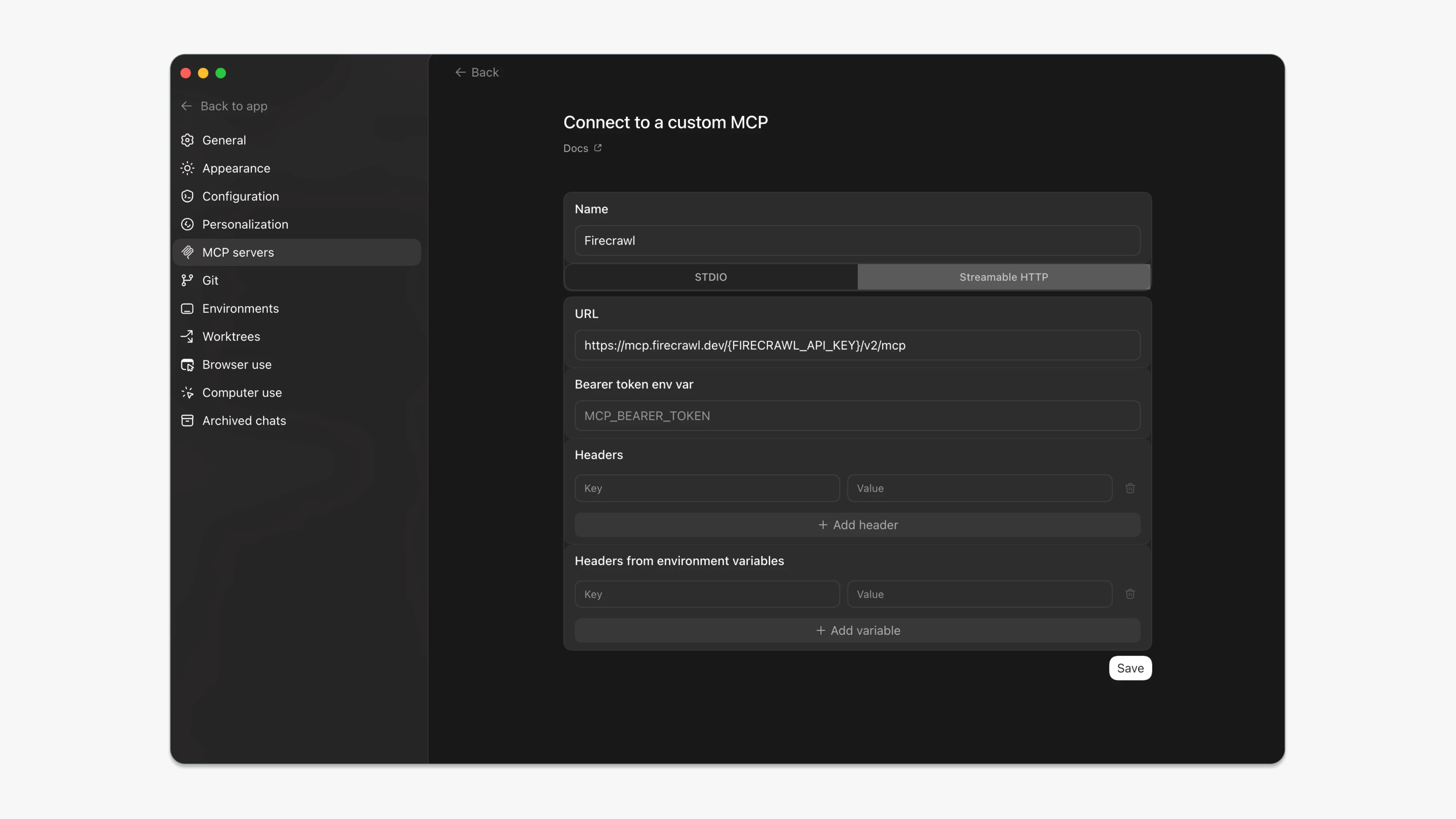
Once active, the App calls Firecrawl tools in the tool use panel during chat. You ask a research question. Codex calls firecrawl_search. Live results come back. Codex reads full-page content and answers from it.
The sandbox boundary still applies. Auth flows, signed-in pages, and browser cookies are off-limits for any search tool. Firecrawl's browser automation tools (firecrawl_browser_create, firecrawl_interact) handle those cases, but that's a separate setup.
Which approach should I use?
| Situation | What to use |
|---|---|
| Fastest setup, no config files | Official Firecrawl plugin |
| Quick one-off research before starting a task | Firecrawl CLI |
| Codex needs to search during a running task | Firecrawl MCP in CLI config |
| Using the Codex App for chat-style workflows | Firecrawl MCP in App config |
| Crawl a full docs site before providing context | Firecrawl CLI |
| You want to see exactly what gets fetched | Firecrawl CLI |
| You want Codex to decide when to search | Firecrawl MCP |
I now run with web_search = "disabled" and Firecrawl MCP wired in. The quality difference on anything touching current docs or recent releases is significant. The dependency audit that opened this post takes about 30 seconds now. Codex searches live, scrapes the changelog, and tells me exactly what broke and when.
The full capability surface: where Codex ends and Firecrawl begins
Codex web_search is an in-session lookup affordance for a coding agent: search the web, follow a link, read the page, cite it, keep coding. Firecrawl is a web-data platform that other systems (including agents) call as infrastructure. Codex is closer to Firecrawl than Claude web fetch is (Codex bundles search + fetch, and its fetch is browser-backed rather than raw HTTP), but the shape of the gap is the same: one is a session convenience, the other is a product surface.
Surface coverage
Codex covers exactly the intersection cell: search a query, read a public page.
| Capability | Codex web search | Firecrawl |
|---|---|---|
| Web search (query → ranked URLs) | ✅ | /search |
| Fetch one URL | ✅ (follow a result) | /scrape |
| Fetch many URLs in one call | ❌ | /batch/scrape |
| Site-wide crawl | ❌ | /crawl with depth, regex, sitemap-first, concurrency |
| URL discovery (sitemap-style) | ❌ | /map |
| Multi-page structured extraction | ❌ | /extract and /agent |
| Browser actions (click, fill, scroll) | ❌ | /scrape actions and /interact sessions |
| Authenticated / logged-in scraping | ❌ | Session profiles hold cookies and auth |
| Screenshots and PDF output of a page | ❌ | screenshot, pdf formats |
| Change tracking / diff across scrapes | ❌ | changeTracking format |
| Prompt injection guard on extraction | ❌ | checkPromptInjection classifier + HTTP 403 |
| Developer index (repos, PRs, docs) | ❌ | Developer Index, leads DevDex at 63.1% Recall@10 |
| Research index (arXiv, GitHub, papers) | ❌ | Research Index |
| Official data providers | ❌ | Firecrawl Alexandria: 400+ providers |
| Programmatic access outside the agent | ❌ (Codex-only tool) | REST API + SDKs (TypeScript, Python, Go, Rust) + MCP |
Structured output
Codex returns model-readable prose with citations. There's no schema, no typed fields, no validation. If you want "extract these 12 fields from every product on this listings page as JSON", Codex reads the page and writes JSON with LLM-typical drift. Firecrawl /extract takes a JSON schema, runs the extractor across many pages, and returns typed data intended for a database.
Specialized indexes: Developer Index and Research Index
Codex web search hits general web results. That works for many lookups, but developer content (code, issues, PRs, docs) and academic content (arXiv, GitHub, papers) are different retrieval problems, and Firecrawl exposes purpose-built indexes for each.
On our open DevDex benchmark, one agent (Claude Opus 4.8) drives every system through the same harness on 1,179 tasks across three tracks (repo, issue-to-fix, docs). Firecrawl's Developer Index, queried through its MCP server, leads the field at 63.1% overall Recall@10 (ahead of Parallel 57.7%, Firecrawl Search 57.6%, Mintlify 54.6%, Exa 53.7%). It leads by wide margins on issue-to-fix (66.0%) and docs (47.2%), the two tracks a general web index struggles most with.
For research agents (chasing citations, surveying prior work, method-level lookups), the Research Index gives direct access to arXiv, GitHub search, and academic literature without a separate scraping step. Codex web search has no equivalent primitive for either surface.
On general web search too, AIMultiple's independent agentic search benchmark put Firecrawl second of eight APIs with the top mean relevance score in the run. Full methodology in the web search API guide.
Firecrawl Alexandria: data that was never on a web page
Live search fixes the stale-cache problem. It doesn't fix the fact that a lot of what a coding agent needs isn't a web page at all. Download trends for two competing packages, a repository's release history, the exact issue thread where a regression was fixed, the latest filing for the fintech API you're integrating: Codex web search can find and read pages that talk about these, but it can't query the provider's own records.
Firecrawl Alexandria is Firecrawl's knowledge library for superintelligence. It puts 400+ official data providers, plus Firecrawl's own Developer, Research, and Government indexes, behind the same search call Codex already makes through Firecrawl. Instead of reading a page that quotes the data, Codex finds the provider that holds it and pulls the record.
For coding work, the providers that matter most:
| Need | Where Alexandria gets it |
|---|---|
| How a library actually behaves, from issues, PRs, READMEs, and docs | Developer Index |
| Which package to pick: download stats and metadata | Package registries, PyPI |
| Repository activity, releases, and maintainers | GitHub |
| Model metadata before you wire one in | Hugging Face |
| Real-world answers to an error message | Stack Exchange |
| Papers behind an algorithm you're implementing | Research Index, Semantic Scholar |
| Financial, economic, or government data your app consumes | SEC EDGAR, FRED, World Bank, USAspending, and more |
It works in three steps, and Codex walks them on its own: it finds matching tools through firecrawl_search with alexandria in its sources (in the CLI, firecrawl search --sources web,alexandria), checks a tool's inputs and price with firecrawl_find_tools (firecrawl find-tools in the CLI), and runs it with firecrawl_scrape. Finding and checking are free; a run is billed at the tool's listed price in credits. Alexandria needs an API key on a team where it's enabled, so it's hidden on the keyless MCP endpoint. Some licensed providers also need an organization admin to accept their terms once.
Prompts that show the difference:
Check PyPI download trends and GitHub release activity for httpx and requests, then recommend one for this service.Search the Developer Index for how people fixed hydration errors after upgrading to Next.js 16, and link the issues and merged PRs.Find recent papers on speculative decoding and outline which technique I could implement in this inference server.In Firecrawl's evaluation across 845 tasks, with the same model, prompts, and blind AI judging, agents using Firecrawl Alexandria scored 21% higher on answer quality than agents using built-in web tools. See Firecrawl Alexandria in ChatGPT and Codex for a walkthrough.
Prompt injection defense: checkPromptInjection
Web pages can contain hidden text crafted to hijack LLM-based extraction (for example, instructions that tell the model to ignore your schema and return attacker-controlled data). This is a real class of attack, not a hypothetical: see what is prompt injection for documented examples and the full defense landscape. Codex web search has no defense at the extraction layer; it reads whatever the page returns and hands it to the model.
Firecrawl ships an opt-in guard called checkPromptInjection on JSON extraction. Turn it on inside the json format object and a dedicated classifier inspects the scraped page content before extraction runs. If a prompt injection attempt is detected, the request fails with HTTP 403 and error code SCRAPE_PROMPT_INJECTION_DETECTED, and no extraction output is returned. The classifier runs in parallel with the extraction, so clean scrapes are not slowed. It also applies to crawl and search, since both call scrape per page.
{
  "url": "https://example.com",
  "formats": [
    {
      "type": "json",
      "schema": { "type": "object", "properties": { "title": { "type": "string" } } },
      "checkPromptInjection": true
    }
  ]
}
Use it on any JSON extraction from untrusted or user-submitted URLs. See what is prompt injection for a deeper look at the attack surface and other defenses.
JavaScript rendering, in more detail
Codex's fetch does render pages (browser-backed, not raw curl), so SPAs generally work: this is a real advantage over Claude WebFetch. But the render is a black box. There's no waitFor selector, no networkidle control, no viewport or mobile emulation, no explicit action sequence before extraction. Firecrawl exposes all of these as first-class parameters, plus an actions array (wait, click, write, press, scroll, screenshot, pdf, executeJavascript) that runs a flow before extraction.
Authenticated content
Codex web search reaches only what a logged-out browser reaches. It can't log into a portal, hold a session, or use your cookies. Firecrawl /interact sessions persist auth state across scrape calls, so gated dashboards, admin UIs, and post-login flows are accessible.
Crawl and discovery
Codex reads one page at a time along whatever links it decides to follow. There's no "give me every page under /docs", no depth control, no include/exclude regex, no sitemap-first strategy, no concurrency knob, no job ID to poll. Firecrawl /crawl and /map are the primitives; both return full site coverage bounded by rules you set.
Volume, quotas, and output formats
Codex web search is metered inside the Codex session budget. It's designed for tens of lookups per task, not thousands. Firecrawl bills as its own service with rate-limit and concurrency plans built for production ingestion (crawl a whole documentation site, hydrate a search feed, batch-scrape a product catalog nightly). Per scrape you can request markdown, cleaned html, rawHtml, links, screenshot, pdf, schema-driven json, changeTracking, and summary. Multiple formats returned in a single call.
Operational features
- Webhooks: Firecrawl posts crawl and batch completion to a URL. Codex has no async result surface outside the agent's own turn loop.
- Change detection: Firecrawl tells you what changed on a page since your last scrape. Codex re-reads from scratch every time.
- File parsing: Firecrawl parses PDF and DOCX served over HTTP into markdown. Codex reads whatever its fetch returns; PDF handling is inconsistent and there's no DOCX path.
- Caching control: Firecrawl's
maxAgeopts into cached scrapes for cost. Codex caching is opaque.
The stack pattern this suggests
The interesting positioning isn't Codex vs Firecrawl, it's Codex with Firecrawl. Codex uses its native web search for casual doc lookup, and delegates to Firecrawl (through its MCP server or an SDK call in the code Codex writes) whenever the task needs JavaScript rendering it can control, structured extraction with a schema, a crawl, auth, or a production pipeline. That's the setup I run and the one this article's config sections describe.
What does the full config look like?
Minimal Firecrawl MCP setup
[mcp_servers.firecrawl]
command = "npx"
args = ["-y", "firecrawl-mcp"]

[mcp_servers.firecrawl.env]
FIRECRAWL_API_KEY = "fc-YOUR_API_KEY"
Full config with retry logic and credit monitoring
web_search = "disabled"

[mcp_servers.firecrawl]
command = "npx"
args = ["-y", "firecrawl-mcp"]

[mcp_servers.firecrawl.env]
FIRECRAWL_API_KEY = "fc-YOUR_API_KEY"
FIRECRAWL_RETRY_MAX_ATTEMPTS = "3"
FIRECRAWL_RETRY_INITIAL_DELAY = "1000"
FIRECRAWL_RETRY_MAX_DELAY = "10000"
FIRECRAWL_RETRY_BACKOFF_FACTOR = "2"
FIRECRAWL_CREDIT_WARNING_THRESHOLD = "1000"
FIRECRAWL_CREDIT_CRITICAL_THRESHOLD = "100"
Codex native web search options
web_search = "cached"    # default, OpenAI-maintained index
web_search = "live"      # real-time results
web_search = "disabled"  # use when Firecrawl MCP is handling search
Should you replace Codex's built-in search?
The sandboxed execution, the task-level reasoning, the ability to plan and run multi-step code changes: that's all good. But the default search setup hands the model a pre-indexed snapshot and no way to know how old it is. For anything time-sensitive, that's a liability.
Firecrawl CLI gives you live search from the terminal in two commands. Firecrawl MCP gives Codex live search, full-page content, and crawling as native tools it can call inside any task. Both work with the CLI and the App. Neither requires you to change how you use Codex, just what data it's working from.
And with Firecrawl Alexandria, Codex reaches past the web to 400+ official data providers and Firecrawl's own indexes, so the answer comes from the source record rather than a page that quotes it. The fastest way to get all of it is to install the official Firecrawl plugin.
Most search tools return links. Firecrawl returns the content. Start with the one-liner to add the MCP server, disable the built-in search, and run the same task that gave you wrong results before. The difference is immediate. For more ways to extend what Codex can do, the best Codex agent skills guide covers eleven skills worth installing alongside it.
Use Firecrawl in your agent
Add Firecrawl to ChatGPT, Claude, Cursor and more in one click.
Frequently Asked Questions
Does Codex search the live web by default?
No. Cached mode is the default. Codex queries an OpenAI-maintained pre-scraped index. To get real-time results, use the --search flag, set web_search = live in your config, or run with --yolo. You can also replace the built-in search entirely with Firecrawl MCP.
Why did Codex give me wrong information even with web search enabled?
There's a documented bug where web search escalation prompts don't fire when sandbox network access is restricted. Codex doesn't throw an error. It fabricates a response and presents it as a search result. Use live mode explicitly, or switch to Firecrawl MCP which makes network calls explicitly.
What's the difference between Firecrawl CLI and Firecrawl MCP?
Firecrawl CLI is a standalone tool you invoke yourself. You control what gets fetched, when, and how. Firecrawl MCP wires Firecrawl into Codex as native tools the agent calls on its own during a task. CLI gives control. MCP gives automation.
Can I use Firecrawl MCP and Codex's built-in search at the same time?
Yes, but it's cleaner to disable the built-in search. Set web_search = disabled in your config. That way Codex always uses Firecrawl's live, filterable search rather than falling back to the cache.
Does Firecrawl MCP work in both the Codex CLI and the Codex App?
Yes. Both read the same ~/.codex/config.toml. Add the MCP config once and both surfaces pick it up.
How much does Firecrawl search cost?
Search costs 2 credits per 10 results, rounded up. Adding scrapeOptions to retrieve full-page content adds 1 credit per page. JSON mode adds 4 credits per page. A free tier is available.
How does Firecrawl handle prompt injection compared to Codex web search?
Codex web search has no prompt injection defense at the extraction layer; it reads whatever the page returns. Firecrawl offers an opt-in guard on JSON extraction called checkPromptInjection. A classifier inspects the scraped page before extraction runs, and if a hidden instruction aimed at the extraction LLM is detected, the request fails with HTTP 403 and error code SCRAPE_PROMPT_INJECTION_DETECTED. No extraction output is returned. It also applies to crawl and search, since both call scrape per page.
Can I invoke Codex web search from my own code?
No. Codex web search is a tool the Codex agent decides to call inside a session. You cannot invoke it from your own code, get raw structured results into a data pipeline, chain it into a non-Codex workflow, or cache the output outside the session. Firecrawl is a REST API with SDKs for TypeScript, Python, Go, and Rust plus an MCP server, so the same call composes into any system.
Does Codex support authenticated or logged-in scraping?
No. Codex web search reaches only what a logged-out browser reaches. It cannot log into a portal, hold a session, or use your cookies. Firecrawl's /interact sessions persist auth state (cookies, localStorage, tokens) across scrape calls, so gated dashboards, admin UIs, and post-login flows are accessible.
What is the fastest way to add Firecrawl to Codex?
Install the official Firecrawl plugin. ChatGPT and Codex share one plugin directory, so open Plugins in Codex, search for Firecrawl, install it, and connect your Firecrawl account. The plugin ships with Firecrawl's skills built in, so there is no API key to paste and no config.toml to edit.
What is Firecrawl Alexandria and how does Codex use it?
Firecrawl Alexandria is Firecrawl's knowledge library for superintelligence: 400+ official data providers, such as package registries, GitHub, Hugging Face, SEC EDGAR, and FRED, plus Firecrawl's Developer, Research, and Government indexes. Through the Firecrawl plugin, MCP server, or CLI, Codex finds a matching tool, checks its inputs and price for free, and runs it at the tool's listed price, pulling the record from the source instead of a page that summarizes it.
What Firecrawl features have no equivalent in Codex web search?
Firecrawl Alexandria's 400+ official data providers, batch scraping, full-site crawling with depth and regex controls, URL discovery via /map, structured JSON extraction against a schema, checkPromptInjection, the /interact endpoint for stateful browser sessions with auth, screenshot and PDF output formats, change tracking as a first-class format, PDF and DOCX parsing, webhooks on crawl and batch jobs, the Developer Index and Research Index, and programmatic access from any language through SDKs or MCP.