 Bex Tuychiev
TL;DR
- What they are: OpenClaw skills are
SKILL.mdfiles with YAML frontmatter and markdown instructions. Install from ClawHub (13,700+ available), skills.sh (Vercel-curated), or build your own. - Top picks: This list covers 19 across web scraping, productivity, agent optimization, and more. Capability Evolver (35K+ installs), Firecrawl CLI, Gog, and self-improving-agent lead the download counts.
- Security warning: A coordinated "ClawHavoc" campaign in early 2026 planted hundreds of malicious skills using typosquatted names to steal SSH keys and API tokens. Always verify the VirusTotal scan on a skill's ClawHub page and check author reputation before installing.
- Build your own: The walkthrough covers building a custom invoice generator skill from scratch and publishing it to the registry.
OpenClaw skills turn a general-purpose AI agent into a specialized one. The ClawHub registry now lists thousands of skills across categories like web scraping, DevOps, productivity, and image generation, with new ones published daily.
But quantity creates its own problem. Finding the right skills among thousands of options takes time you could spend building. This article covers the best OpenClaw skills worth installing today, organized by category, plus a walkthrough for creating and publishing your own.
What are OpenClaw skills?
An OpenClaw skill is a directory containing a SKILL.md file. That file has two parts: YAML frontmatter declaring metadata and a markdown body with the actual instructions. The frontmatter covers the basics (name, description, version) plus any requirements the skill needs to run. The body acts as a runbook: what to do, what inputs to collect, how to handle failures, and what format to return.
A trimmed SKILL.md frontmatter looks like this:
---
name: todoist-cli
description: Manage Todoist tasks from the command line.
version: 1.2.0
metadata:
  requires:
    env:
      - TODOIST_API_KEY
    bins:
      - todoist-cli
    install:
      node: todoist-cli
---
# Todoist CLI Skill

When the user asks to manage tasks, use the `todoist-cli` binary...
The metadata block declares what the skill needs: environment variables, binaries, and install commands for npm, Homebrew, or uv. OpenClaw checks these at load time and warns you if anything is missing.
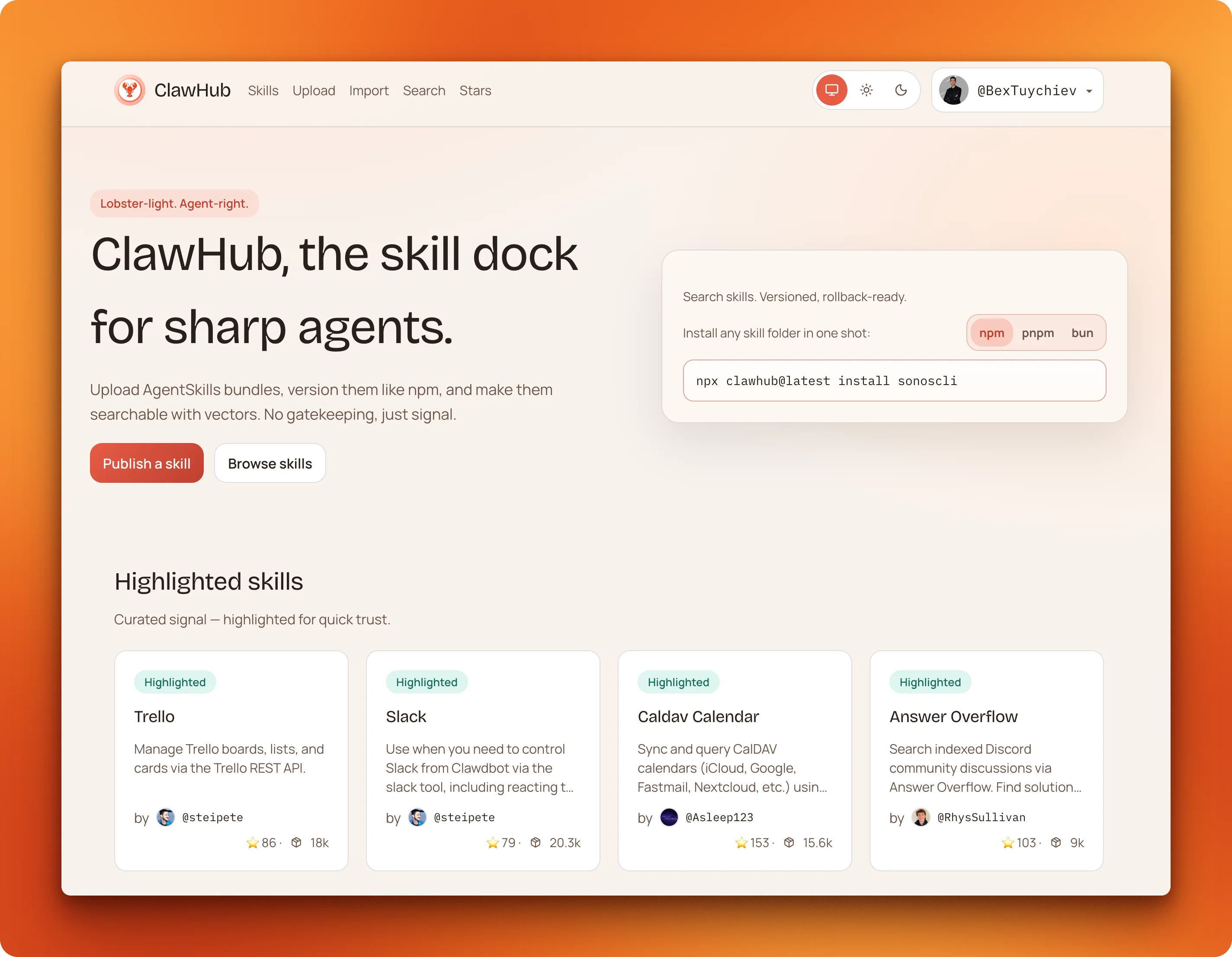
The ClawHub registry is where most skills live. As of February 2026, it hosts 13,729 skills published by individual developers and companies. The VoltAgent community maintains a curated awesome list of 5,494 vetted skills from that pool.
Instead of writing the same agent instructions from scratch each time, you install a skill someone already tested and refined. For a broader look at how OpenClaw fits among other open source AI agent frameworks, see our framework comparison guide.
How to access OpenClaw skills?
The fastest way to install a skill is through the ClawHub CLI:
npx clawhub@latest install <skill-slug>You can also search the registry from your terminal with clawhub search "web scraping" to browse what is available. To install a skill manually, copy its folder into ~/.openclaw/skills/ for global access or <project>/skills/ to scope it to a single workspace.
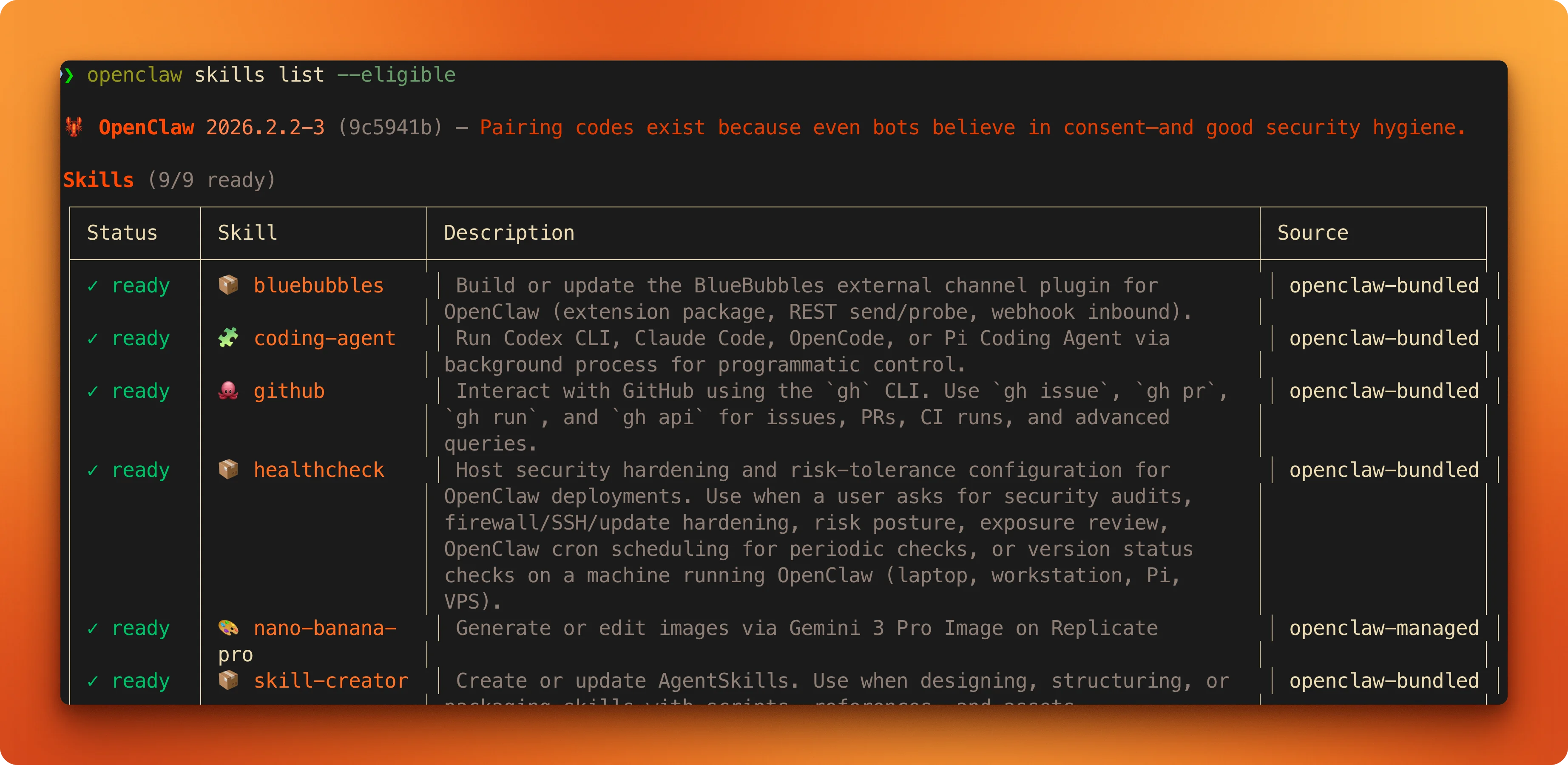
After installing, run openclaw skills list --eligible to confirm OpenClaw detects the skill. Use openclaw skills info <skill-name> to inspect its metadata and requirements.
For a pre-vetted alternative to ClawHub, skills.sh (maintained by Vercel) curates a smaller set of community skills with higher quality standards. OpenClaw also ships 53 bundled skills out of the box — these carry zero registry risk and are a safe starting point before reaching for community plugins.
Not everything on ClawHub is safe to install. A February 2026 audit reviewed 2,857 skills and flagged 341 as malicious — 335 were distributing the AMOS macOS stealer. A subsequent coordinated campaign called "ClawHavoc" planted hundreds more malicious skills using typosquatted names (subtle misspellings of legitimate tools like claw__d__hub instead of clawhub) to install backdoors that exfiltrated SSH keys, API tokens, and browser session cookies. ClawHub responded by removing 2,400+ suspicious skills and partnering with VirusTotal for automated scanning.
Before installing any skill from an unfamiliar author:
- Check the VirusTotal report: Every ClawHub skill page now shows an automated security scan. Only install if it shows "Benign."
- Review the source: SKILL.md files are plain text — read them. Look for undeclared environment variable access, hidden network calls, or obfuscated shell commands.
- Verify the author: Skills from @steipete (OpenClaw's creator) are effectively first-party. High version counts and star ratings signal community vetting.
- Run untrusted skills in a Docker sandbox: OpenClaw supports container-based isolation; use it for anything you haven't personally reviewed.
- Use a scanner: ClawDex provides a preliminary security scan, and the Skill Vetter skill (covered below) can check for malicious patterns before you commit to installing.
For a deeper look at OpenClaw security vulnerabilities and hardening your deployment against prompt injection and credential theft, see our dedicated guide.
What are the best OpenClaw skills?
We picked these 19 based on download counts from ClawHub, star ratings, author reputation, and whether the skill fills a gap that OpenClaw's built-in tools leave open.
| Skill | Category | Downloads | What it does |
|---|---|---|---|
| Capability Evolver | Agent optimization | 35K+ | Autonomously improves agent performance and capabilities over time |
| Firecrawl CLI | Web extraction | -- | Scrape, crawl, search, and run browser sessions on any website |
| Gog | Productivity | 33.8K | Gmail, Calendar, Drive, Docs, Sheets, and Contacts in one skill |
| self-improving-agent | Agent memory | 32K | Captures learnings across sessions so your agent improves over time |
| Ontology | Knowledge | 27.6K | Typed knowledge graph with structured relationships between entities |
| Summarize | Productivity | 26.1K | Summarize URLs, PDFs, audio files, and YouTube videos |
| Github | Development | 24.8K | Manage issues, PRs, and CI runs through the gh CLI |
| Notion | Productivity | 13.9K | Read and write Notion pages, databases, and comments |
| Nano Banana Pro | Creative | 13.4K | Generate and edit images via Gemini |
| API Gateway | Development | 13K | Managed OAuth to 100+ APIs like Stripe, Salesforce, and HubSpot |
| Obsidian | Knowledge | 12.4K | Local-first Obsidian vault integration with no cloud dependency |
| OpenAI Whisper | Media | 11.5K | Local speech-to-text where audio never leaves your machine |
| Mcporter | Development | 11.1K | Install and manage MCP servers from inside OpenClaw |
| Himalaya | Communication | 9.2K | IMAP/SMTP email that works with any provider |
| Slack | Communication | 8.8K | Search and send messages across Slack workspaces |
| N8N Workflow | Automation | 8K | Chat-driven control over your local N8N instance for multi-app flows |
| Apple Native Skills | macOS | 3.5-6.5K | Mail, Calendar, Reminders, Notes, and Shortcuts with zero API keys |
| Skill Vetter | Security | 3.5K | Scan skills for malicious code before installing them |
| GStack | Agent optimization | -- | Turns Claude Code into an AI engineering team when OpenClaw delegates to it |
Web extraction
OpenClaw's built-in web_fetch tool breaks on JavaScript-heavy pages. Firecrawl handles these and returns clean markdown ready for LLM context across six commands: search, scrape, crawl, map, browser, and credit-usage.
Install it with a single command:
npx -y firecrawl-cli init --browser --allThe --browser flag opens a browser window for Firecrawl authentication. The --all flag installs the skill to every detected AI coding agent, enabling remote browser sessions without a local Chromium install. Multiple concurrent sessions run in isolated sandboxes, so your agent can fill forms, click through multi-step flows, and scrape the results. See the Firecrawl + OpenClaw docs for the full setup reference.
Firecrawl is now a default search provider in OpenClaw, reflecting how reliably it returns clean, LLM-ready content on JavaScript-heavy pages where alternatives fall back.
For a deeper look at the search command, see the OpenClaw web search guide. To compare which search provider to use — Firecrawl, Brave, Tavily, Perplexity, or SearXNG — see the best OpenClaw search providers guide. The full Firecrawl integration guide covers setup and advanced use cases, and the CLI reference docs have the complete command list.
Productivity and knowledge
2. Gog (33.8K downloads)
Instead of installing six separate Google Workspace integrations, Gog bundles Gmail, Calendar, Drive, Docs, Sheets, and Contacts into one skill. "Send the Q3 report to Sarah and add a follow-up meeting for Thursday at 2pm" becomes one sentence instead of two apps.
3. self-improving-agent (32K downloads)
The highest-starred skill on ClawHub (338 stars), self-improving-agent captures corrections and learnings across sessions in structured Markdown files. Fix a mistake once and the agent writes it down; learnings that recur three or more times within 30 days get promoted to permanent project memory.
4. Ontology (27.6K downloads)
Where self-improving-agent stores learnings as text, Ontology builds a typed knowledge graph with structured relationships. "This contact works at that company, which is a client on this project." Your agent can traverse those connections later to answer questions that depend on how entities relate to each other.
5. Summarize (26.1K downloads)
Point it at a 45-minute conference talk, a research PDF, a long article, local audio files, or a YouTube video and get a condensed version back. The CLI tool handles the full extraction-to-summarization pipeline, including fallback to Firecrawl for blocked sites and transcript extraction for video content.
6. Notion (13.9K downloads)
Connects to the full Notion API for pages, databases, blocks, and comments. Setup requires a Notion integration token, and the skill handles pagination internally: ask for "all tasks in the Q1 roadmap database" and you get a flat list.
7. Obsidian (12.4K downloads)
The local-first counterpart to Notion. Plain markdown, no cloud, no account. It searches your vault, creates notes, and manages links between them.
Development
8. Github (24.8K downloads)
"Check if any CI runs failed overnight and summarize the errors." The Github skill wraps the gh CLI with agent-friendly patterns for triaging issues, reviewing PRs, and debugging CI failures. No new permissions needed; it teaches your agent the right commands instead of letting it hallucinate flags.
9. API Gateway (13K downloads)
If your agents call third-party APIs, API Gateway (47 published versions) handles the OAuth plumbing. Token refresh for over 100 services including Stripe, Salesforce, and HubSpot runs without you wiring up auth flows manually.
10. Mcporter (11.1K downloads)
Configuring MCP servers by hand means editing JSON files, managing auth tokens, and restarting processes. Mcporter turns that into agent-directed commands: discover available servers, inspect tool schemas, run calls, and handle OAuth flows from inside OpenClaw.
Communication
11. Himalaya (9.2K downloads)
Not everyone uses Gmail. Himalaya provides IMAP/SMTP email for Outlook, ProtonMail, custom domains, or any provider supporting standard protocols.
12. Slack (8.8K downloads)
Handles messages, reactions, pins, and files within a workspace. Configurable threading gives three reply modes (off, first message only, or every message), and the agent can fetch recent channel history to summarize what it missed.
macOS native
13. Apple Native Skills (3,500 to 6,500 downloads each)
@steipete, the creator of OpenClaw, maintains five macOS skills: Mail, Calendar, Reminders, Notes, and Shortcuts. Each one taps into Apple's native APIs with zero configuration and no API keys. If you have built any Apple Shortcuts automations, the Shortcuts skill makes all of them available to your agent.
Creative and media
14. Nano Banana Pro (13.4K downloads)
Image generation without an OpenAI dependency. Runs on Google's Gemini 3 Pro Image API and handles both text-to-image generation and image-to-image editing, where you provide a source image plus instructions like "make the sky more dramatic."
15. OpenAI Whisper (11.5K downloads)
Local speech-to-text where no audio leaves your machine. No API key, no cloud upload. Outputs plain text or SRT subtitles from MP3 and M4A input.
Security
16. Skill Vetter (3.5K downloads)
Before installing a skill from an unfamiliar author, run it through Skill Vetter first. It checks for undeclared environment variable access, hidden network calls, and obfuscated shell commands.
Agent optimization
Capability Evolver is the most downloaded skill on ClawHub by a wide margin, with over 35,000 installs. It monitors your agent's performance patterns, identifies gaps in how it handles recurring tasks, and improves its behavior over time without manual tuning. Teams running long-lived agents find it reduces the maintenance overhead that accumulates as workflows grow more complex. Unlike self-improving-agent (which captures explicit corrections), Capability Evolver works autonomously in the background.
Install it with:
clawhub install capability-evolverNo API key required. It runs entirely on local context and writes nothing to external services, which is why it holds a bundled-tier trust rating on ClawHub despite coming from the community registry.
18. GStack
OpenClaw regularly delegates tasks to Claude Code internally. GStack is a skill toolkit built by YC President and CEO Garry Tan that upgrades what Claude Code can do when that happens — adding skills for office hours, design, code review, QA, and browser testing so it acts more like a full AI engineering team than a single coding assistant.
Garry also ships a gstack-lite variant specifically tuned for OpenClaw: faster for routine tasks, but configured to think harder and get more done on the ones that matter.
Install it with:
npx skills add https://github.com/garrytan/gstackRepo: github.com/garrytan/gstack.
Automation
If your team already runs N8N locally, this skill turns OpenClaw into a natural language interface for your entire automation stack. Instead of navigating the N8N dashboard to trigger or modify workflows, you describe what you want in chat. "Every Monday at 9am, pull last week's analytics and email me a summary" becomes a workflow created entirely through conversation.
The real advantage over cloud-based alternatives: N8N runs on your own infrastructure, so no workflow data leaves your environment. Useful for content teams chaining Gmail, Dropbox, and Slack together, or ops teams building multi-step approval processes.
Install it with:
clawhub install n8n-workflowRequires a running local N8N instance. The skill handles the API connection; you manage the N8N server separately.
How to create your own OpenClaw skill?
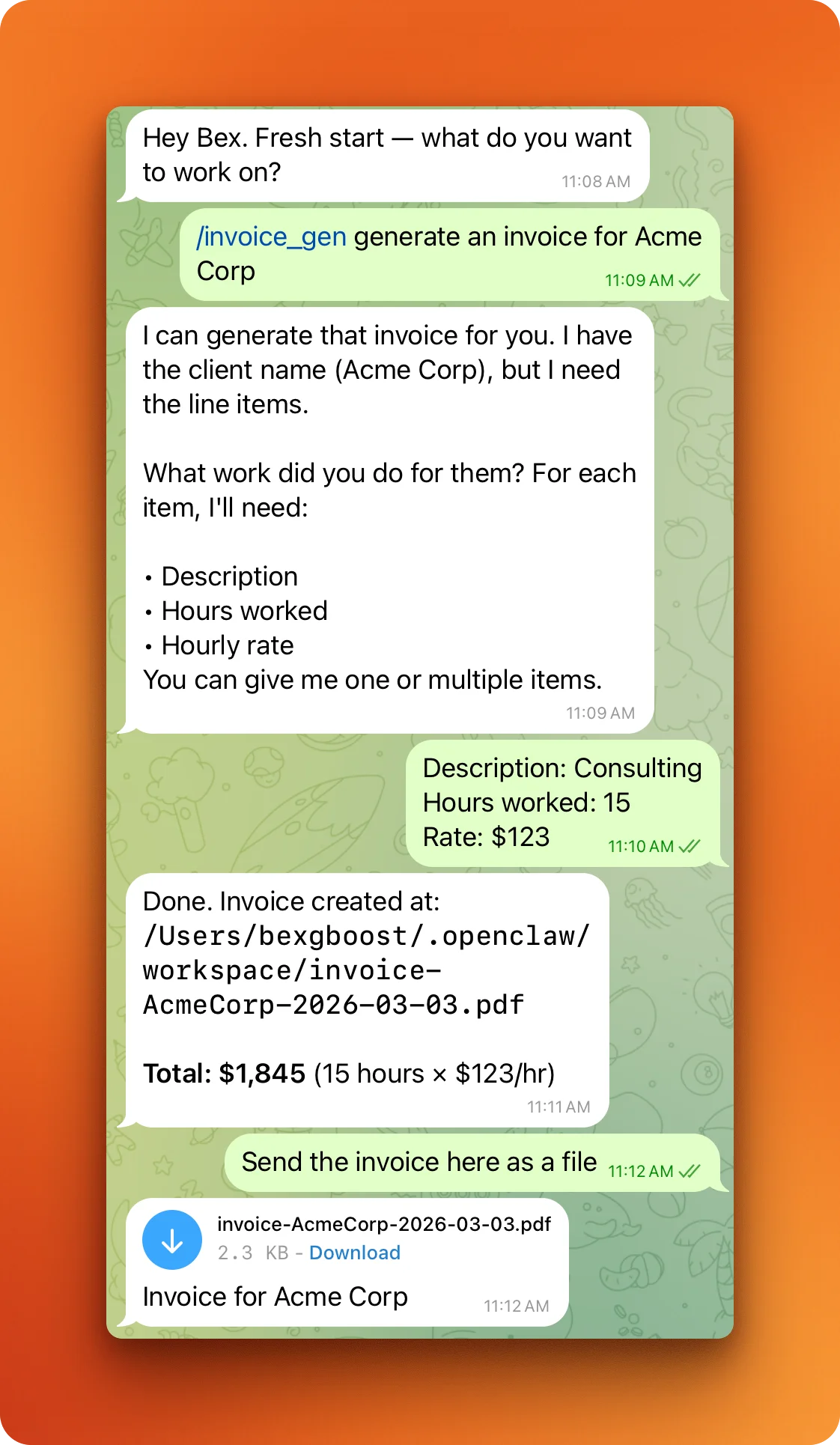
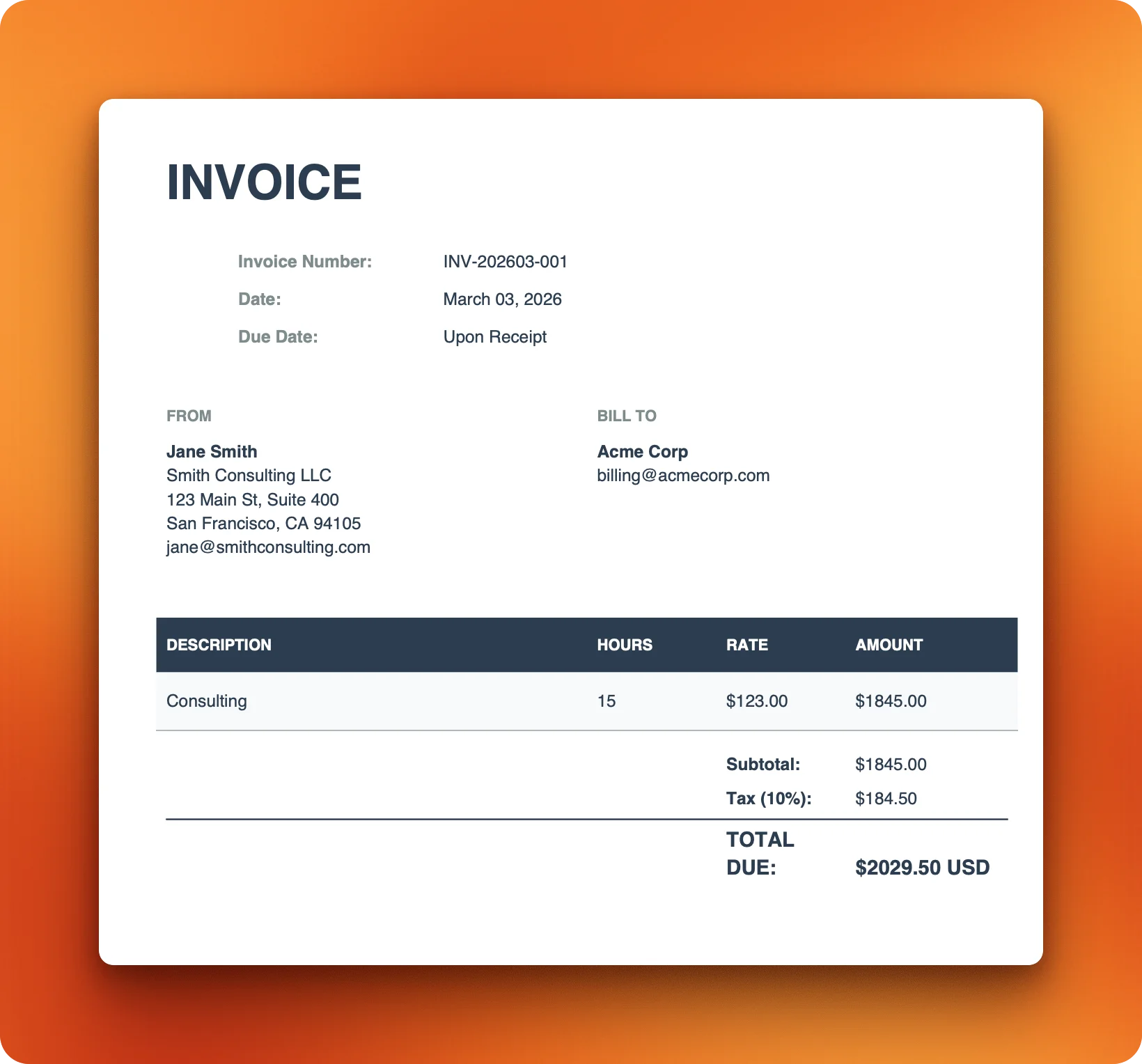
If nothing on ClawHub fits your workflow, building a custom skill takes a directory, a SKILL.md file, and optionally a supporting script. Claude Code uses the same SKILL.md format — if you're building for Claude Code rather than OpenClaw, the Claude Code skill tutorial covers the full workflow with a web scraping example. If you want to skip the manual work, the Claude skills generator can scaffold a complete skill file from any documentation URL automatically. This walkthrough builds an invoice generator that collects billing details from the user and outputs a formatted PDF.
How do you set up the skill directory?
The folder name becomes the skill's slug on ClawHub, so it needs to follow the registry's naming rules: lowercase letters, numbers, and hyphens only, starting with a letter or number.
mkdir invoice-gen && cd invoice-genA skill needs at minimum a SKILL.md. This one also includes a Python script for PDF templating, so the final structure is:
invoice-gen/
├── SKILL.md
└── generate_invoice.py
What goes in the SKILL.md?
The frontmatter declares runtime dependencies. Since the "What are OpenClaw skills?" section earlier covered the full frontmatter spec, this example just needs python3 on PATH and reportlab installed via uv:
---
name: invoice-gen
description: >
  Generate PDF invoices from client details, line items,
  hours, and rates. Use when the user asks to create,
  generate, or make an invoice.
version: 1.0.0
metadata:
  openclaw:
    requires:
      bins:
        - python3
    install:
      uv: reportlab
---
The description field is how OpenClaw decides which skill to activate when dozens are loaded at once. "Generate PDF invoices from client details, line items, hours, and rates" beats a vague "Helps with invoices" because it gives the agent specific phrases to match against user requests.
The instruction body tells the agent what to collect and how to run the script. {baseDir} resolves to the skill's install directory at runtime:
# Invoice Generator

## Inputs

Collect these from the user before generating. Ask for any missing.

- **client**: Company or individual name
- **items**: One or more line items, each with a description,
  hours worked, and hourly rate
- **output**: Where to save the PDF
  (default: `./invoice-{client}-{date}.pdf`)

## Workflow

1. Collect all inputs. If the user gives a single item without
   an hours/rate breakdown, ask for clarification.
2. Format items as a JSON array:
   `[{"description": "...", "hours": N, "rate": N}]`
3. Run the generation script:
   python3 {baseDir}/generate_invoice.py \
    --client "CLIENT_NAME" \
    --items 'JSON_ARRAY' \
    --output "OUTPUT_PATH"
4. Confirm the file path and total amount to the user.

## Error handling

- If `reportlab` is missing, run `uv pip install reportlab`
  and retry.
- If the output directory doesn't exist, create it first.
The workflow steps are numbered and specific for a reason. Vague instructions like "generate an invoice" leave the agent guessing at implementation; exact commands with placeholder values give it a fill-in-the-blanks template. The error handling covers the two likeliest failures rather than trying to anticipate every edge case.
Why use a dedicated script?
Without a dedicated script, the agent would build invoice layouts from scratch each time, producing inconsistent formatting. The generate_invoice.py script uses reportlab to render a formatted PDF with invoice metadata, a line items table, tax calculation, and totals. The full script is too long to inline here, but it takes three CLI arguments (--client, --items as a JSON array, --output) and produces a clean, professional-looking PDF. Download it into your skill directory to follow along.
How do you test a skill locally?
Copy the skill to your local skills folder and check that OpenClaw detects it:
cp -r invoice-gen ~/.openclaw/skills/
openclaw skills list --eligible
openclaw skills info invoice-gen
If invoice-gen shows up in the eligible list, the requirements are met and the frontmatter parsed correctly. OpenClaw's file watcher picks up changes to SKILL.md within 250ms, so you can edit the instructions and test again without restarting your agent session.
How do you publish to ClawHub?
Install the ClawHub CLI and log in with your GitHub account (must be at least one week old):
npm i -g clawhub
clawhub login
Publish the skill with a version tag and changelog:
clawhub publish ./invoice-gen \
  --slug invoice-gen \
  --version 1.0.0 \
  --changelog "Initial release with PDF generation and multi-item support"
ClawHub runs VirusTotal scans on every published skill automatically. Your declared metadata (binaries, environment variables) must match what the code actually uses. If the script references an env var or binary that the frontmatter doesn't declare, the scan flags a metadata mismatch and blocks the publish.
To push updates later, edit your files and re-publish with a bumped version:
clawhub publish ./invoice-gen \
  --slug invoice-gen \
  --version 1.1.0 \
  --changelog "Added multi-currency support"
Or use clawhub sync --bump patch to auto-increment the version across all your published skills at once.
Conclusion
Start with Firecrawl CLI for web scraping and browser automation, Capability Evolver for self-improving agent behavior, Gog for Google Workspace, and self-improving-agent for persistent memory across sessions. Before installing anything beyond the 53 bundled skills, verify the VirusTotal scan on each skill's ClawHub page. Browse the full list on ClawHub, skills.sh, or the VoltAgent awesome list.
For anything the registry doesn't have yet, build a custom skill and publish it. The full cycle from mkdir to clawhub publish takes a few minutes.
Frequently Asked Questions
Are OpenClaw skills free?
The skills themselves are free and open source, though some connect to paid APIs like Firecrawl or OpenAI that require separate subscriptions.
How do I update an installed skill?
Run `npx clawhub@latest install <skill-slug>` again to pull the latest version. Pin a specific version by appending `@1.2.0` to the slug.
Can I use OpenClaw skills with any LLM?
OpenClaw supports Claude, GPT, DeepSeek, Gemini, and local models through Ollama. Skills work the same regardless of which model you choose, since the agent runtime handles the translation between the skill's instructions and the model's API.
What is the difference between workspace and global skills?
Workspace skills live in `<project>/skills/` and only load for that project. Global skills live in `~/.openclaw/skills/` and load everywhere. If both contain a skill with the same name, the workspace version takes priority. You can override a global skill's behavior for a single project without touching the original.
How do I share a private skill with my team?
Commit the skill directory to your team's git repository. Anyone who clones the repo gets the skill in their workspace automatically. For wider distribution without publishing to ClawHub, package the skill as an npm module or share it through a private GitHub repo.
Can I use the Firecrawl skill without an API key?
No. The Firecrawl CLI skill requires a FIRECRAWL_API_KEY set in your environment or configured in openclaw.json. You can get a free tier API key from firecrawl.dev that includes 500 credits to start.
What was the ClawHavoc attack on ClawHub?
ClawHavoc was a coordinated attack campaign in early 2026 where a threat actor uploaded hundreds of malicious skills to ClawHub using typosquatted names — subtle misspellings of popular tools. These skills installed backdoors that exfiltrated SSH keys, API tokens, and browser session cookies. ClawHub responded by removing over 2,400 suspicious skills and implementing automated VirusTotal scanning for all published skills.
How do I verify a ClawHub skill is safe before installing?
Check the VirusTotal scan on the skill's ClawHub page — only install if it shows Benign. Read the SKILL.md file directly; it is plain text, so look for undeclared environment variable access, suspicious network calls, or obfuscated shell commands. Verify the author's reputation and version history, and run unfamiliar skills in a Docker sandbox before giving them access to your real environment. ClawDex (clawdex.koi.security) offers an additional preliminary security scan.
What are bundled skills in OpenClaw?
OpenClaw ships with 53 skills included by default. These bundled skills carry zero registry risk because they are maintained by the OpenClaw team and distributed with the application itself. They cover common tasks like web fetch, code execution, and file management. Bundled skills are a safe starting point before installing community plugins from ClawHub.

data from the web